An invitation to show your product at the buyer’s office often comes at an important point in the purchase. A recent Gartner survey of 645 B2B buyers found that sales reps remain buyers’ most important source of information when they are choosing a preferred supplier and building support for the purchase inside their company. The same survey found that 69% of buyers prefer to check what AI tools tell them with a sales rep, which is one reason face-to-face conversations matter more as sales teams adopt AI.
An in-person demo also works differently from a video call. Colleagues may drop in for the part that concerns them, you can see who leans in and who goes quiet, and the decision carries on after you leave, among people who weren’t in the room.
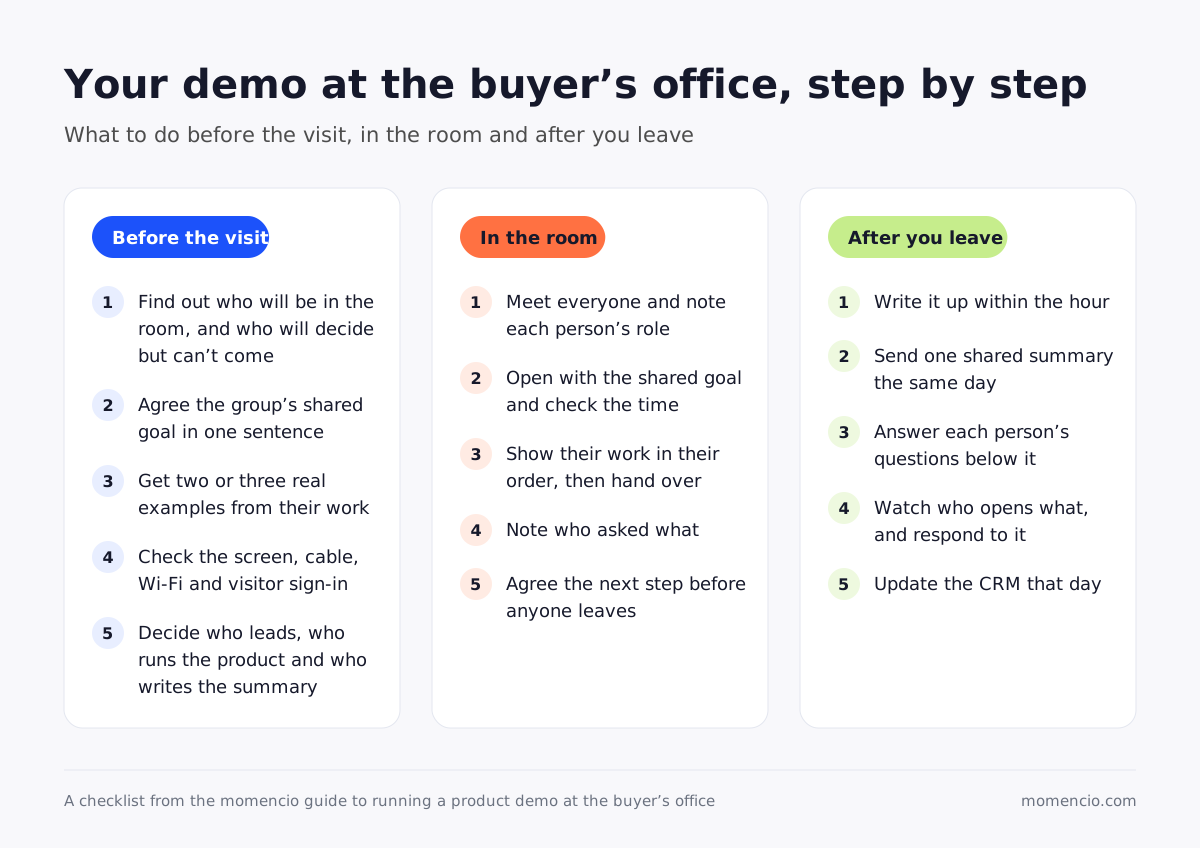
Plan an in-person product demo at the buyer’s office around the group’s shared goal, record what each person asks and follow up the same day. This guide walks you through each of those steps, from what to settle with your main contact before the visit to the summary you send before the end of the day.
What changes when the demo is at the buyer’s office?
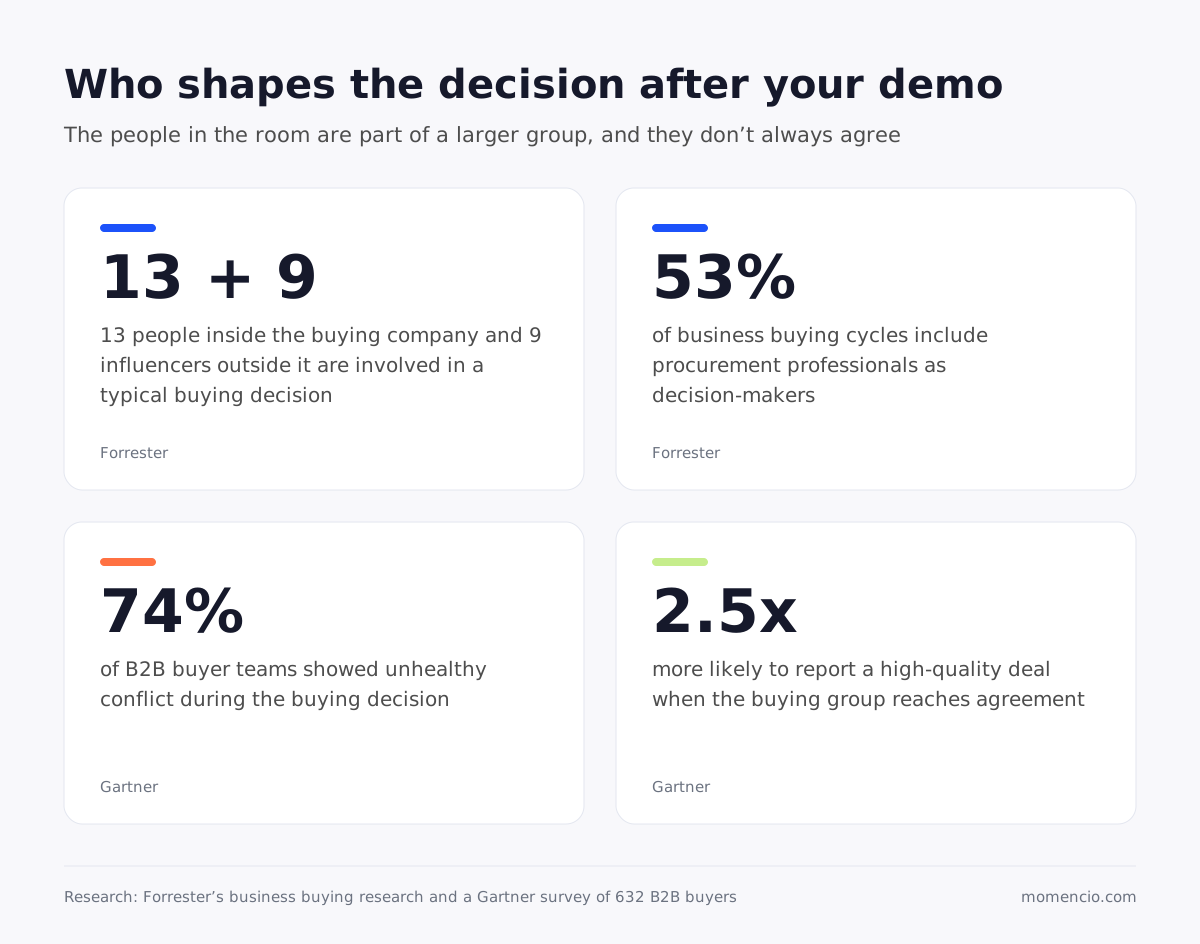
The people in the room are only part of the group that will decide. Forrester’s 2026 research on business buying found that the typical buying decision now involves 13 people inside the buying company and nine influencers outside it, and that the number rises for more complex purchases. Even a full meeting room holds only some of them, so what you show has to make sense when someone who was there explains it to someone who wasn’t.
Procurement is often among them. The same research found that procurement professionals are decision-makers in 53% of business buying cycles. Expect questions about price, contract terms or data security at the table, even when the meeting was booked as a product demo, and bring the answers or a colleague who has them.
The people at the table may also disagree with each other. A Gartner survey of 632 B2B buyers found that 74% of buyer teams showed unhealthy conflict during the buying decision, and that groups that reached agreement were 2.5 times more likely to say their deal was a high-quality one. With everyone in one room, you hear those differences directly, and you can help the group work through them while you’re there.
That gives you two jobs during the visit. Help the group agree on what it needs, and leave with a clear record of who wants what, so the people who weren’t there hear the same story.
What should you settle before the visit?
Book a short call with your main contact a few days before the visit, and use it to settle the points below.
Find out who will be in the room
Ask for each person’s name, their role and what they want to see. Then ask who else will have a say in the decision but can’t attend, because those people will depend on your follow-up. If procurement, IT or security will join, ask what they usually check, so you can prepare for it.
Agree on the one problem the whole group wants solved
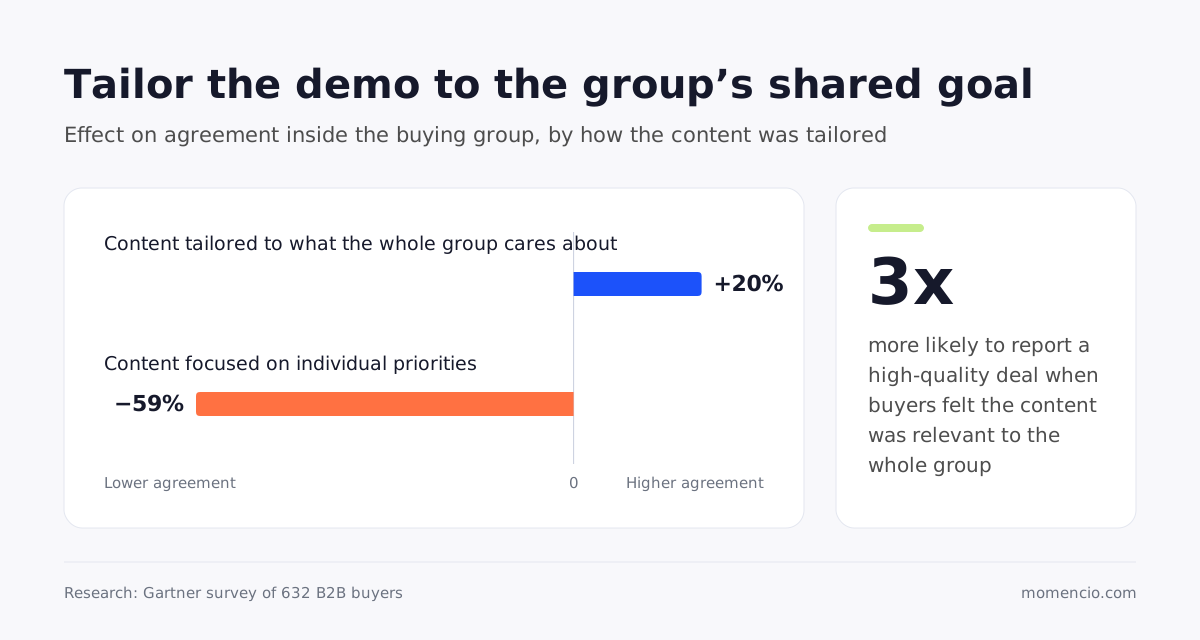
It’s tempting to give every person a slot for their favorite feature. The same Gartner survey found that tailoring content to what the whole buying group cares about improved agreement by 20%, while content focused on individual priorities had a 59% negative impact on agreement. Buyers who felt the content was relevant to the whole group were three times more likely to report a high-quality deal.
So agree on the shared goal first. Write it in one sentence, in the words your contact uses, and send it to them to confirm, for example: “Shorten the time the team spends preparing the monthly report.” Every part of the demo should then show how your product helps the group reach that goal, and each person’s questions should be answered in the light of it.
Ask for real examples from their work
Buyers want to see proof that a product will work in their own conditions. Forrester found that more than 60% of business buyers now use a trial to evaluate potential solutions, rising to 78% for purchases of $10 million or more. Ask your contact for two or three real cases to use in the demo, such as a recent order, a report the team builds by hand or a task that takes too long today, with anything confidential removed. A demo built on their own cases is the closest thing to a trial you can offer in an hour, and it gives the people in the room something concrete to describe to colleagues who weren’t there.
Check the room, the screen and the connection
Ask which screen you’ll use and which cable it takes, whether guests can join the Wi-Fi and whether their network blocks any tool you need. Bring your own adapter and a mobile hotspot, keep an offline copy of your demo and materials on your device, and sign in to everything before you walk into the room. Find out how long visitor sign-in takes, and arrive early enough to set up while the room is still empty.
Decide who does what on your side
If two of you are going, agree that one person leads the conversation and the other runs the product, and that both of you note what people ask. If you’re going alone, tell the group at the start that you’ll pause to write down their questions, so the pauses feel natural. Before you arrive, decide who will write the summary and send it the same day.
How do you run the demo in the room?
Meet everyone and note their details first
Introduce yourself to each person as they arrive, swap business cards or contact details, and note each person’s role and what they say they want to see. You’ll need all of it for the follow-up, and it’s harder to collect once the demo has started.
Open with the shared goal
Start by reading out the one-sentence goal you agreed and checking how much time everyone has. Ask whether anything has changed since you last spoke, then ask each person what would make the hour worth their time. Write down their answers, because they tell you which parts of the demo matter to whom.
Show the work in the order their team does it
Use the examples they gave you, and follow the order in which their team actually does the work. After each step, ask the person who does that job whether it matches how it happens today. Then hand over the laptop or tablet and let someone try a task themselves. A person who has done the task in your product can describe it to colleagues in their own words after you’ve gone.
Write down who asked what
Research on memory for conversation shows that people remember what they said themselves better than what they heard. In a demo, you do most of the talking, so you’re likely to leave remembering your demo better than their questions. Note each question with the name of the person who asked it, along with any concern, objection or moment when the group disagreed. Those notes tell you what each person needs before they can say yes, and they become the core of your follow-up.
Note the questions you can’t answer yet
When someone asks a question you can’t answer on the spot, write it down with their name, tell them when they’ll have the answer and include it in your summary. A promised answer that arrives on time gives you a reason to stay in touch, and it gives the group an early sense of how you work.
Agree the next step before anyone leaves
Ask for the next step while the whole group is still at the table, and offer two specific times. Ask who else should join, especially people who’ll have a say but missed today. If the next step is a trial, agree what it needs to prove and who will judge it. Our guide to booking a follow-up meeting in person covers the wording, and if someone needs to check their calendar first, a booking link on your digital business card lets them pick a time later.
What should you do after you leave the building?
Write it up within the hour
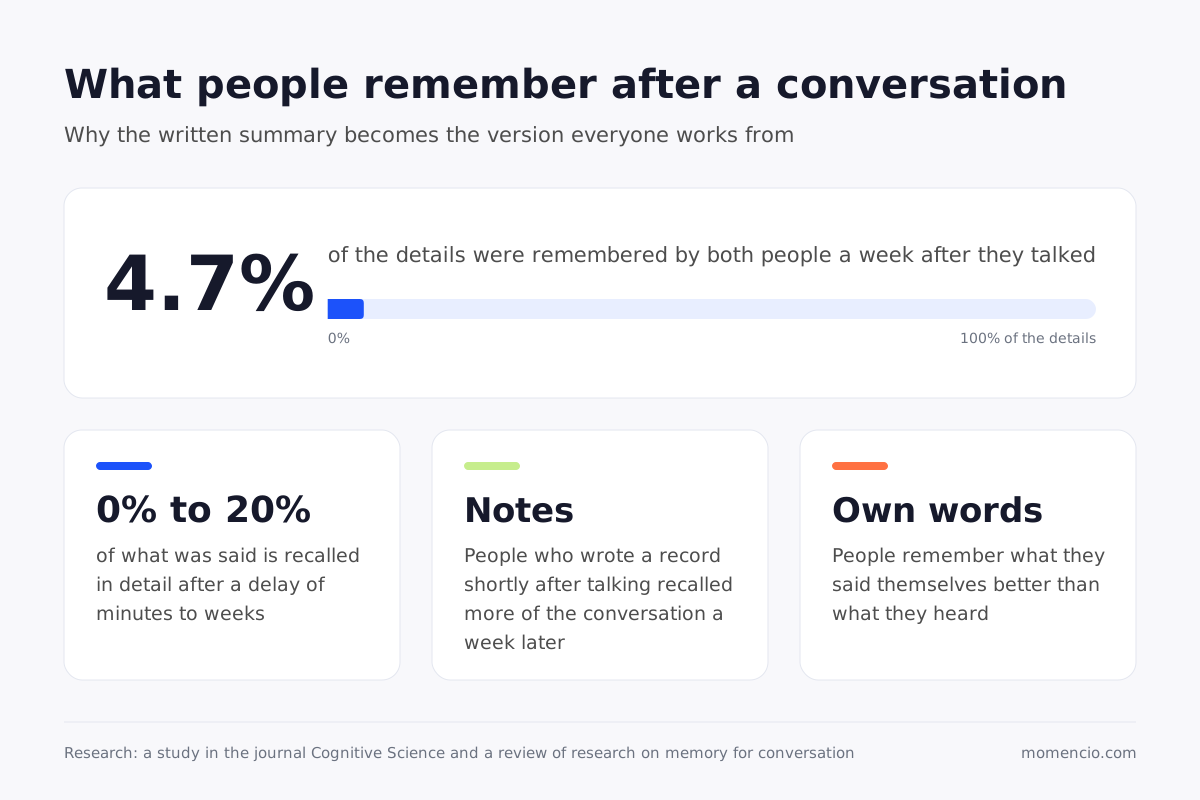
Memory for a conversation fades quickly. In a study of people who talked in pairs, only 4.7% of the details were remembered by both people a week later, and those who wrote a record of the conversation shortly afterward recalled more of it. So within a week, you and the buyers are likely to remember different parts of the same demo. Write up the questions, concerns and agreed next step within the hour, before you head to your next meeting, and that record becomes the version everyone works from.
Send everyone the same summary first
Send one written summary the same day to everyone who attended and to the people your contact said will have a say. Start with what the whole group shares: the goal you agreed, what you showed against it, what the group decided and the next step with its date. Below that, answer each person’s own questions. This follows the Gartner finding above, where content built around the group’s shared goal helped people agree, and content built around individual priorities could create conflict.
Write it so it can be forwarded as it is. Use plain words, explain anything that only made sense in the room and attach the material you showed, so a colleague who missed the demo can follow it.
Watch what people do with it
Who opens the summary and what they go back to gives you a good read on where the deal stands. If the person from finance opens the pricing material twice, offer them a short call about cost. If the person who’ll use the product every day hasn’t opened anything, ask your main contact whether something is holding them back. And when someone who wasn’t in the room gets in touch about the demo, it’s a sign your contact is building support for you inside the company.
Update the CRM the same day
Add every attendee to the deal, with their role, their questions and the next step, so your manager and colleagues see the same story you do. Use the five questions that show whether a meeting record is complete as your check, and the record will still make sense when the deal comes up for review weeks later.
How can sales managers tell whether on-site demos are working?
A demo at the buyer’s office can take most of a rep’s day once travel is included, so it’s worth checking what each one produced. Five questions cover it:
- Was everyone in the room added to the deal, with their role?
- Did the demo end with a next step booked for a specific date?
- Did the summary go out the same day?
- Has anyone who wasn’t in the room engaged with it since?
- Which questions from the demo are still open?
When a manager can see those answers for every demo in one place, forecasts can rest on what buyers did after each visit.
How momencio supports a demo at the buyer’s office
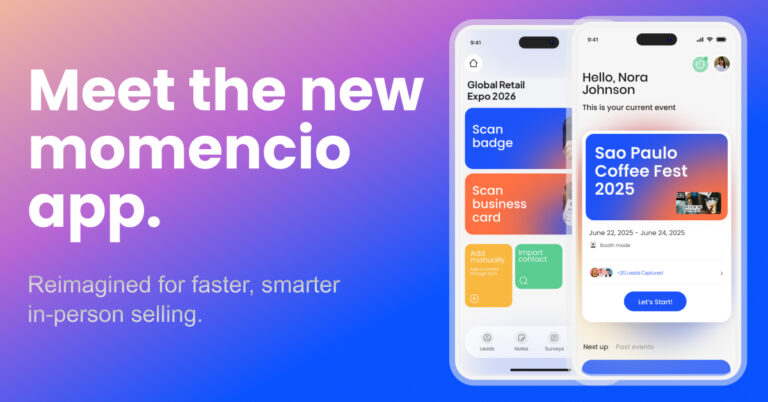
momencio is a field sales app for selling in person, backed by a Field Revenue Intelligence platform that keeps the full record of each buyer conversation. Events are one of its main uses, and the same app covers meetings, field visits and content presentations, so a demo at a buyer’s office runs through the same tools as a conversation at a trade show.
In the room, reps scan each person’s business card with their phone camera, and AI EdgeCapture™ fills in details such as job title, work email and LinkedIn profile where they’re publicly available. Notes can be typed or spoken and stay on each person’s record, along with tags and a rating of how strong the lead is. Demo material can be presented from the device and preloaded so it works without Wi-Fi, contacts captured offline sync once the device reconnects, and the next meeting can be booked in the app before the group leaves the table.
After the visit, each attendee can receive a personalized LiveMicrosite™, a page built from your content library that greets them by name. It can hold the material you showed and the documents that person asked for, and because it can be edited after it’s sent, you can add an answer you promised in the room, and they’ll see it the next time they open the link. Every view, click, scroll, download and return visit is logged in IntelliStream™ against the named contact, so you can see who is reading and what they keep coming back to.
Sales managers can see follow-up activity for each rep, including content shared and microsites sent, and live dashboards track leads captured, meetings booked and progress toward sales goals. momencio can also connect to your CRM, so contacts, notes and activity reach the records your team already uses. Presentations, LiveMicrosites™ and IntelliStream™ are available on the plans that include them.
Frequently asked questions
- How long should an in-person product demo be?
- Use the time your main contact agreed when the visit was booked, and plan your part to finish with at least 15 minutes left for questions and the next step. If more people join than expected, shorten the walkthrough before you cut the questions.
- Should I bring a colleague to an on-site demo?
- Bring one if the group will ask technical questions you can’t answer alone, such as questions about setup, data or security. Agree beforehand who leads the conversation, who runs the product and who writes the summary.
- What if people I didn’t expect join the demo?
- Welcome them, ask each person their role and what they need to see, and add them to your notes. Then check the order of the demo against what they’ve told you, and move their part earlier if they can’t stay long.
- What should I do if the buyer’s Wi-Fi or screen doesn’t work?
- Switch to your mobile hotspot and the offline copy of your demo. If the screen won’t connect, gather the group around a laptop or tablet for the key steps, and send a short recording of the rest with your summary.
- How soon should I follow up after an on-site demo?
- Send the written summary the same day, while you and the buyers still remember the details. People who write a record of a conversation shortly after it recall more of it a week later, and the summary gives everyone the same version to work from.
- What should I send people who missed the demo?
- Send them the same summary as everyone else, with the material you showed and the next step. Then offer them a short session of their own, so they can see the parts that matter to them.
See how momencio keeps every person, question and follow-up from a demo at the buyer’s office in one record. Book a demo.