
In short: Sales reps can get meetings booked from a digital business card with the right timing, wording and setup, so buyers can pick a time themselves.
A good face-to-face conversation with a buyer often ends with an agreement to talk again. The buyer has described a problem you can help with, the timing looks right, and you both mean it. Then you part without a date, because they need to check with a colleague, their next meeting is about to start, or their calendar is on a laptop somewhere else.
From there, the meeting usually depends on your follow-up. You send an email, then a reminder, and the meeting gets booked when one of your messages arrives at a moment the buyer has a few minutes to reply.
A digital business card that carries your calendar hands that next step to the buyer. They can open your card whenever they’re ready and book the meeting themselves, without waiting for your next email.
This guide walks you through why that matters to buyers, the moments to share your card, what to say, how to set it up, what to do once a meeting is booked, and how sales managers can tell whether it’s working.
If the buyer can agree on a time while you’re together, take it. We covered how to book a follow-up meeting in person in a separate guide. This one is for the conversations that end before a time is set.
Why let buyers book the meeting themselves?
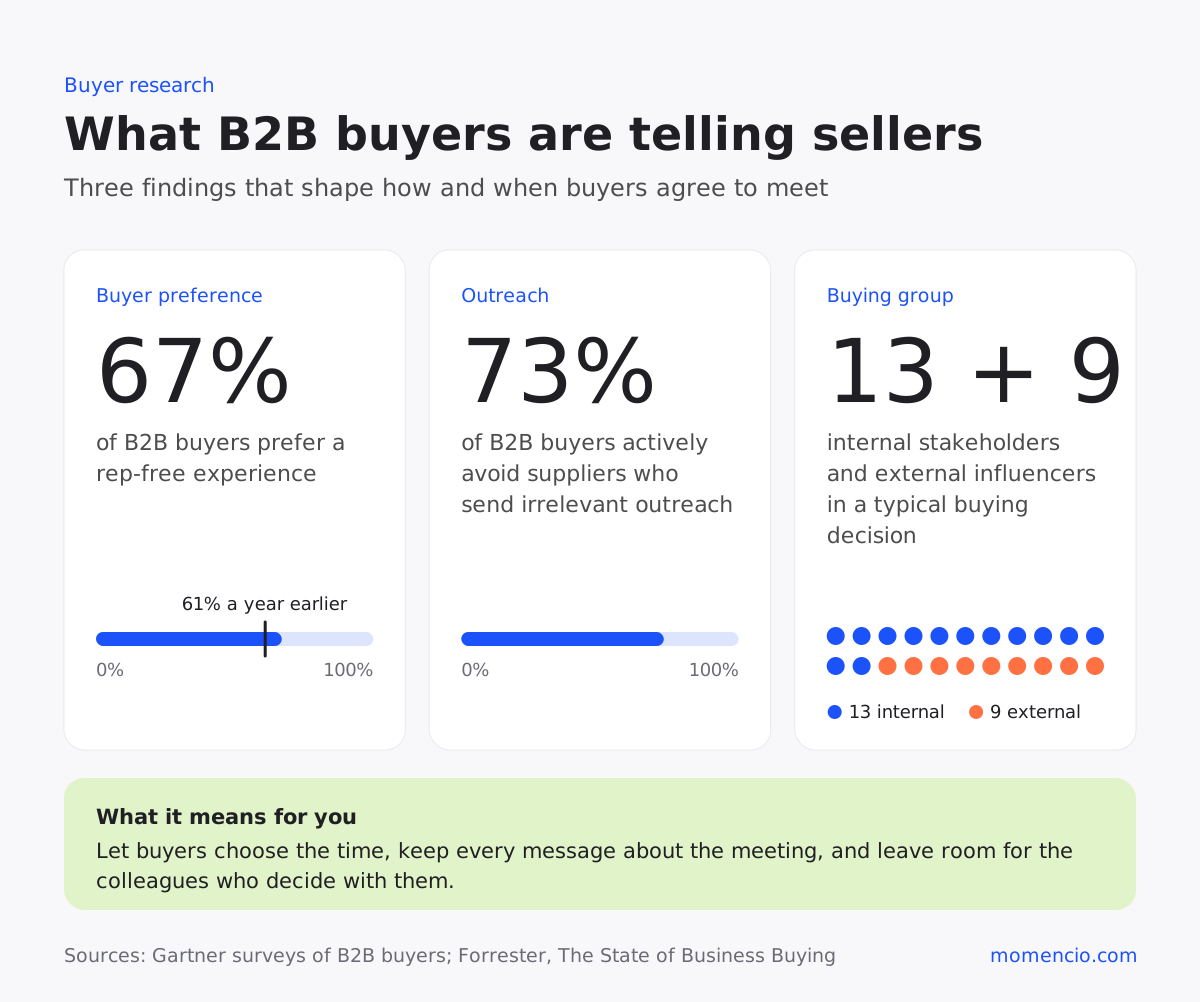
B2B buyers want to deal with suppliers on their own terms. In a Gartner survey of 646 B2B buyers, 67% said they prefer a rep-free experience, and in Gartner’s survey the year before, the figure was 61%. Gartner’s advice to sellers is to stay helpful while keeping the experience low-friction.
Buyers still want a seller for the questions that need context. Gartner’s earlier survey found that for tasks such as working out whether a product or service fits their company’s needs, buyers prefer to get input from a seller.
That is usually the meeting you’re trying to book: the conversation about fit, pricing or rollout. What slows it down is the arranging, and a booking link on your card turns the arranging into one step the buyer takes when it suits them.
It also cuts the chasing. The earlier survey found that 73% of B2B buyers actively avoid suppliers who send irrelevant outreach, and after a good conversation, a run of “just checking in” emails can start to read that way.
Once the meeting is in the calendar, every message you send can be about the meeting itself: what you’ll cover, what you’ll bring and who else should join.
Buying decisions also involve far more people than the one you met. Forrester found that a typical decision now involves 13 internal stakeholders and nine external influencers, and the number rises for complex purchases. The person you met is rarely deciding alone, so the time that suits them has to suit a colleague as well. A link they can open later, with that colleague in the room, gets you a meeting both of them can attend.
What changes when the buyer picks the time?
Two studies from outside sales, one on flu shots and one on medical appointments, offer useful clues about what happens when people commit to a time.
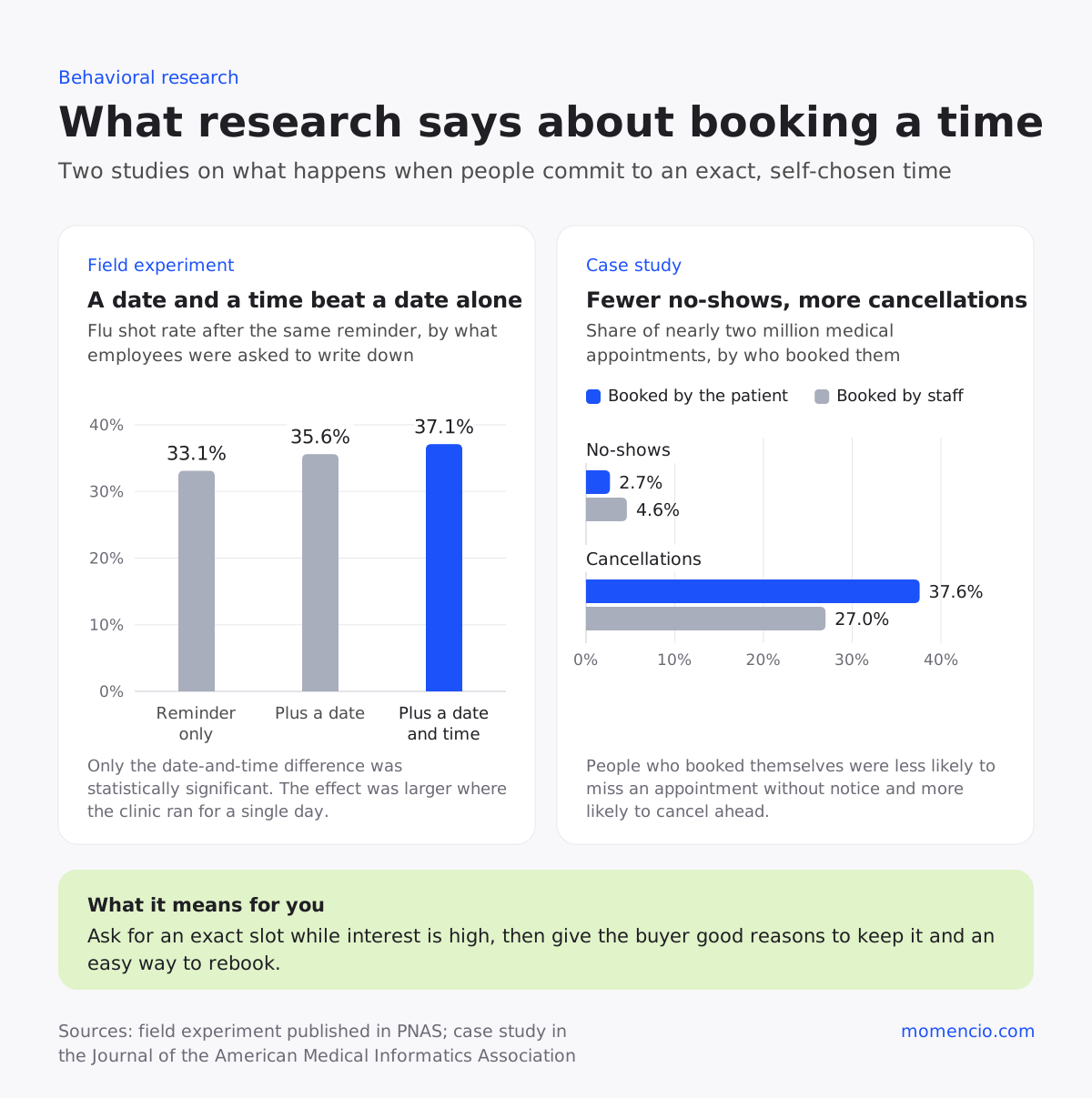
The first is about how specific the plan is. In a randomized field experiment at a large company, employees who were prompted to write down the date and time they planned to get a flu shot were vaccinated at a rate of 37.1%, compared with 33.1% for colleagues who got the same reminder without the prompt. Writing down only a date made a smaller difference that wasn’t statistically significant.
The effect was also larger at sites where the clinic ran for a single day, which suggests that a concrete plan matters most when the window is short. The study was about flu shots, so treat it as a comparison: a buyer who picks a slot on your calendar has also made a plan with a specific date and time.
The second is about what happens after people book. It comes from a physician group with more than 30 practice sites, so read it as a comparison for sales too. In a study of nearly two million medical appointments, patients who booked online themselves missed 2.7% of their appointments, compared with 4.6% for appointments booked by staff.
They also canceled more often: 37.6% of self-booked appointments were canceled, against 27.0% of the others.
Put together, the research gives you two jobs. Ask for an exact slot while interest is high, ideally before the buyer puts their phone away. Then give them good reasons to keep it and make rebooking easy, because in the healthcare data, people who chose their own time missed fewer appointments without notice and canceled more often in advance.
When does a booking link on your card help most?
The booking link does its best work when a time can’t be agreed on the spot. These four moments come up often in field sales, and the wording beside each one is a starting point you can adapt.
| Moment | What the buyer needs | What you can say |
| They need to check with colleagues | Time to find a slot that suits whoever should join | “Once you’ve checked who else should be there, pick a time on my card. My calendar is on it.” |
| The conversation gets cut short | A quick way back to you when they have time | “This deserves more than five minutes. Book half an hour whenever it suits you, and I’ll bring the comparison we talked about.” |
| They ask you to send something first | Time to read before they meet | “I’ll send it this afternoon. When you’ve had a look, you can book a time from my card or from the page I send.” |
| They’re interested, and the project starts later | A way to act when the timing is right | “When the project gets going, my calendar is on my card. Book whatever time works for you then.” |
There’s a fifth moment, and you won’t see it happen. A few days after you meet, the buyer may open your card again to recall what you discussed. If your card offers a time to talk at that point, they can book the meeting there and then.
How should you set up your card so booking takes seconds?
A behavioral science framework called EAST suggests four ways to encourage an action: make it easy, attractive, social and timely. It makes a good checklist for a card you want buyers to book from.
Make it easy to book
Keep the meeting short and the choice simple. A first follow-up rarely needs more than 30 minutes, and a shorter slot is easier to fit into a full week. Offer times across the next week or two, and only the hours you can protect: block travel days, the morning after a long event and the time you’ll need to prepare. Then open your own card on your phone and book a test meeting, since that’s where many buyers will tap the link.
Make the meeting worth booking
A booking link works best when the buyer knows what they’ll get from the meeting. Before you share your card, name one specific thing you’ll bring: the pricing for their volumes, a comparison with the setup they described, or an answer you need to check with your team. Make sure the name, role and company on your card match how you introduced yourself, so the buyer recognizes you when they open it a week later.
Make it easy to bring colleagues
With so many people involved in a decision, make it simple for the buyer to bring someone along. Tell them they’re welcome to share your card with whoever should join, and ask which colleague usually gets involved in decisions like this one. If they mention a name, offer to send a short summary they can forward.
Make it timely
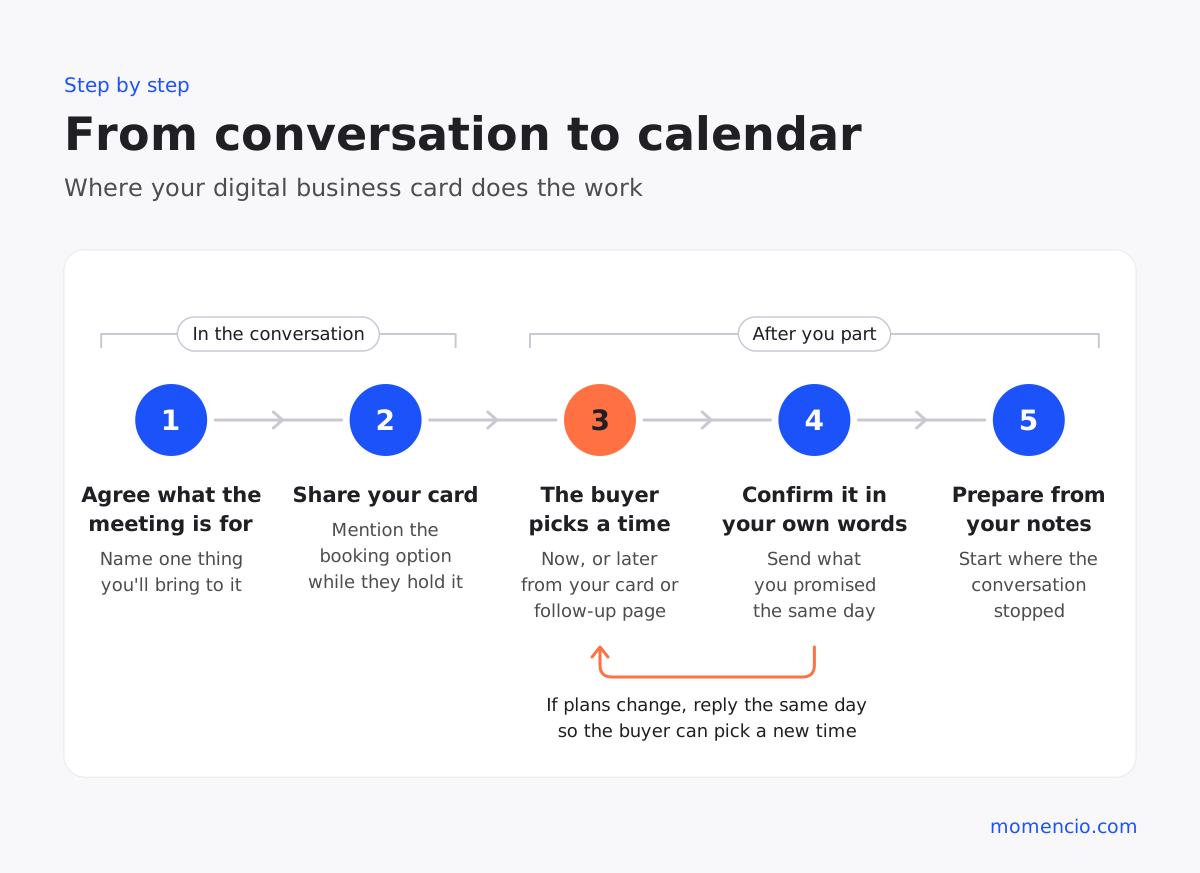
The same framework says to prompt people when they’re most receptive, and for a buyer that’s the end of a conversation that went well. Mention the booking option at that moment, while they’re holding your card, and repeat it in the follow-up you send the same day. If your follow-up includes a personalized page with the material you discussed, put the booking option on that page too.
What should you do once a meeting is booked?
Use the days between the booking and the meeting to give the buyer good reasons to attend and an easy way to change the time.
Confirm it in your own words
Send a short message the same day, separate from the calendar invite, saying what you’ll cover and what you’ll bring. If the buyer asked for material, send it now so they can read it before you meet, and keep it to what they asked about. Check that it matches what you said in person and what your company’s website says, because 69% of B2B buyers in Gartner’s earlier survey reported inconsistencies between a supplier’s website and what its sellers told them.
Prepare from what they told you
The meeting should start where the conversation stopped. Before it, reread what the buyer said about their problem, the words they used and the people they mentioned. Those details fade quickly after a busy day, so capture what was said before your next conversation starts.
Make a cancellation easy to rebook
Treat a cancellation as a request for a new time. Reply the same day with your booking link and one line on what you’ll still cover. A buyer who cancels with notice is still talking to you, and a quick, friendly reply keeps the conversation going.
What if the buyer doesn’t book?
Some buyers will save your card and not book, and that’s normal. Give it a few business days, then send one message that adds something useful and ties back to what they told you, with the booking option underneath. Make sure one person owns that message: if a colleague met the buyer with you, decide before you leave which of you will send it. Knowing what buyers do with the content you send helps you decide what that message should say.
How can sales managers tell whether it’s working?
For sales managers, card booking adds a second route to a meeting, and it’s worth measuring on its own. Three measures give a clear picture.
| Measure | What it tells you | When you can read it |
| Meetings booked by buyers from a card or follow-up page, as a share of conversations where a card was shared | Whether reps share the card with a reason to meet | Within a week or two of the conversations |
| Days between the conversation and the booking | How long interest holds, and when a second message helps | As bookings come in |
| Meetings held and next steps agreed, split by self-booked and rep-booked meetings | Whether both routes lead to meetings of the same quality | After the meeting dates |
If self-booked meetings are canceled more often than the ones reps book, look at what happens between the booking and the meeting before changing anything else.
How calendar booking works in momencio
momencio is a field sales app for teams who sell in person. Its Field Revenue Intelligence platform keeps the context of every in-person conversation with a buyer and turns it into next steps, and calendar booking is one of the ways a good conversation becomes a booked meeting.
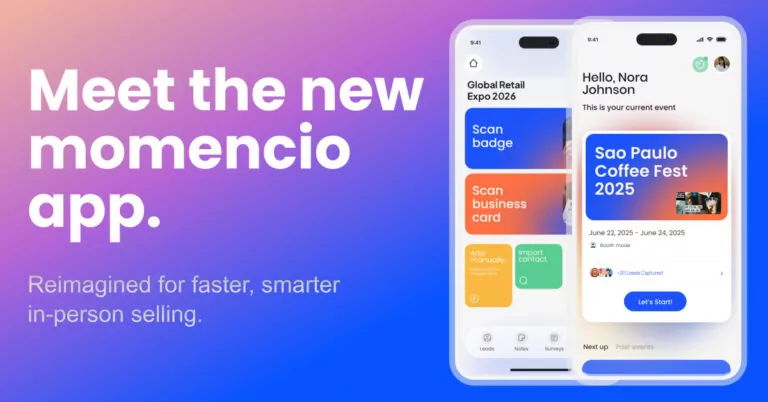
Every rep has their own digital business card inside the redesigned momencio app, with phone, email, company details and LinkedIn in one link. The people you share it with can save you as a contact or add your card to Apple Wallet.
Since the October releases, cards and LiveMicrosites™ support calendar booking. You connect your card to an integrated Office 365 or Google calendar and configure your availability based on your connected email provider. The people you meet can then check your availability and book time with you from the card. The LiveMicrosite™ Calendar Widget can use the same integrated calendar or a scheduling link you already use, so the personalized LiveMicrosite™ you send after the conversation can carry the booking option too, on plans that include it.
When the buyer is ready to agree on a time on the spot, you can book the meeting directly in the app while the conversation is still happening, choosing the day, time and duration without leaving the lead record. Spoken notes and a dedicated notes tab keep the reason for the meeting with the contact. Meetings you book in the app this way appear on live dashboards alongside leads captured and progress toward sales goals, and momencio connects to your CRM.
Frequently asked questions
- What should a sales rep include on a digital business card?
- Include your name, role and company, a direct phone number and email address, your LinkedIn profile and a way to book time with you. Keep the details the same as your email signature, so buyers recognize you wherever they find you.
- Should I share my card before or after asking for a meeting?
- Ask for the meeting first. If the buyer can agree on a time there and then, book it; if they can’t, share your card as the way to book once they’re ready. In both cases, say what the meeting is for.
- How much availability should I offer on my card?
- Offer enough times for the buyer to find a slot in the next week or two, and list only times you can keep, so you rarely need to move a meeting the buyer chose.
- What should I do if a buyer cancels?
- Reply the same day with your booking link and one line on what you’ll still cover. A cancellation with notice often means the timing changed, so make the new time easy to pick.
- Does a booking link replace the follow-up email?
- You still need the follow-up email, because it gives the buyer a reason to book. Send it the same day with what you promised and the booking option included.
- What if the buyer works in a different time zone?
- Offer times that fall within the buyer’s working hours as well as yours, and write the meeting time in their time zone in your confirmation message, so there’s no doubt about when you’ll meet.
See calendar booking on a momencio digital business card for yourself. Book a demo and pick a time that suits you.