
Most event teams treat the scan like the win. The badge is scanned, the card is saved, the contact appears in a list, and the team feels the lead is safely captured. That is useful, but it is still early.
The better question comes next: what did the person do after the follow-up? Did they open the page, click the product sheet, come back later, share the link, fill a form, or ignore everything? That movement is where event lead follow up becomes more than a polite email.
A scanned contact tells you who you met. A follow-up signal tells you who is still interested after the noise of the event fades.
The scan is the beginning of the story
A scan is a snapshot. It captures a moment in a crowded place, often with incomplete context. The person may have been curious, serious, polite, lost, or just collecting vendor information for someone else. The scan alone cannot tell you which one is true.
That is why treating every scanned contact the same creates weak follow-up. One person may need a pricing conversation this week. Another may only want a product overview. A third may have no real buying role but can introduce the right person. If all three get the same email, the tool did the capture job but missed the sales job.
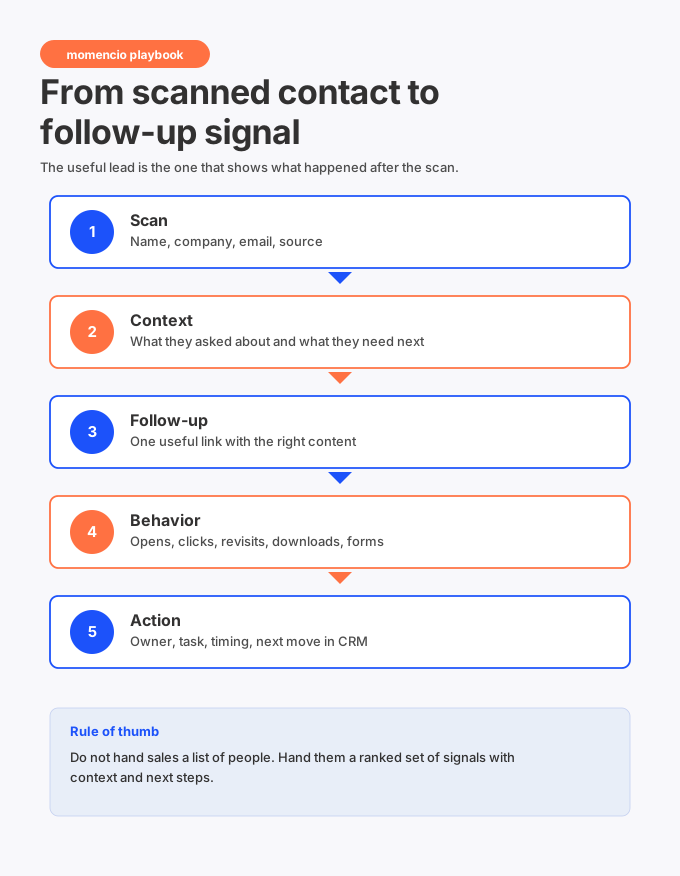
The useful work starts when capture, context, content, behavior, and CRM action stay connected. That is the difference between a list and a working pipeline.
What a follow up signal actually means
A follow-up signal is any action after the first contact that shows the lead is paying attention. It could be an email open, a click, a revisit, a content view, a form fill, a demo video view, or a reply. The signal matters because it happens when the buyer is away from your booth and acting on their own time.
The signal is stronger when it is tied to context. An email open by itself is light. An email open plus a return visit to the integration page plus a second look at pricing content is more useful. The pattern matters more than the single action.
Hidden insight: the highest-value event data often appears after the booth conversation, not during it.
The problem with treating every scan the same
A basic event workflow puts leads into one bucket: scanned. That bucket is too blunt. It rewards booth traffic but does not tell sales where to spend time first.
The better workflow separates captured contacts from active buyers. The separation does not need to be complicated. You are looking for simple evidence: who had a reason to talk, who received relevant follow-up, who came back to the content, and who now deserves a faster sales move.
| If the record only says | Sales still has to guess | A better record says |
| Scanned at booth | Why did they stop? | Asked about HubSpot sync after seeing the workflow demo. |
| Sent follow-up email | Was it useful? | Opened the LiveMicrosite and viewed the integration checklist twice. |
| Lead score 40 | What caused the score? | High score from pricing page revisit and form fill after the event. |
| Assigned to sales | What should sales say? | Book technical fit call and send implementation timeline. |
This is why the record has to carry more than contact data. It needs a thread of what happened, what was sent, what the person did next, and what sales should do now.
The signal ladder
Not every action deserves the same reaction. A single open does not mean someone is ready to buy. A form fill after revisiting a product page deserves a faster response. The job is to build a simple ladder that helps the team avoid both underreacting and overreacting.
| Signal level | What it can mean | Practical sales move |
| Attention | The lead opened or clicked once. | Keep the follow-up helpful and do not rush the call. |
| Interest | The lead viewed content tied to the booth conversation. | Send one useful next asset or ask a focused question. |
| Active research | The lead came back later or viewed multiple assets. | Route to the owner and suggest a timely check-in. |
| High intent | The lead filled a form, watched key content, or revisited decision-stage material. | Create a task, call quickly, and reference the exact topic. |
| Buying motion | The lead asked for a meeting, shared buying details, or involved others. | Move from nurture to opportunity planning. |
This ladder keeps sales from chasing every click while still catching the leads that are clearly warming up. It also gives marketing a better way to explain event impact, because the story is no longer only about scan count.
Capture the reason before you capture the follow up
The follow-up signal becomes much more useful when the original reason is saved. If the lead asked about compliance and later views a security document, that is meaningful. If they asked about integrations and later return to the HubSpot page, that is meaningful too. Without the original reason, the same action is harder to read.
This is where reps need a fast note habit. The note does not need to be polished. It only needs to preserve the useful part of the conversation. A short line like ‘Needs Salesforce routing for regional reps’ or ‘Asked whether HubSpot activity can show event engagement’ gives future signals a frame.
A good event lead capture app should make that easy from the floor, because waiting until later usually means the notes become vague or disappear entirely.
Send a follow up that can tell you something back
A plain attachment can deliver information, but it cannot tell you much. Once the email is sent, the team often loses visibility. The lead may read it, forward it, ignore it, or come back to it later, and sales may never know.
A trackable follow-up path changes that. With a LiveMicrosite, the lead gets a focused page that can hold the assets tied to the conversation. The sales team can see whether the person opens, clicks, downloads, revisits, or fills a form. The follow-up starts giving information back.
This is not about spying on people. It is about using engagement to make the next touch more useful. If someone only viewed the overview, the next message should stay light. If someone came back to technical content three times, sales can be more direct.
How signals should move into HubSpot or Salesforce
Signals are only useful if the team can see them where work happens. For most teams, that means HubSpot or Salesforce. If the activity stays trapped in the event tool, sales has to check another dashboard, and that usually means the signal gets missed.
Inside HubSpot, the record should show the contact, event source, conversation topic, content sent, recent engagement, owner, and next task. A HubSpot integration is valuable when it keeps those pieces together instead of forcing marketing ops to move them manually later.
Salesforce teams need the same thing. A Salesforce integration should help sales see event activity in the same place they manage accounts, opportunities, and next steps. The goal is simple: no one should have to ask, ‘Where did this lead come from and what did they do?’
Field mapping is the quiet part that decides whether this works. If notes, source, campaign, score, and activity land in random fields, the data becomes noise. This is why CRM mapping for trade shows should be planned before the first scan happens.
The sales handoff should change when the signal changes
A static handoff says, ‘Here are the event leads.’ A signal-based handoff says, ‘Here are the people who showed fresh interest and what they looked at.’ That is a very different starting point for sales.
When the signal changes, the task should change too. A light click may trigger a simple nurture touch. A return visit to a buyer guide may trigger a sales task. A form fill after the event may trigger immediate routing. The best workflow keeps the movement visible and assigns the next step without waiting for someone to inspect a spreadsheet.
How momencio can help you
Momencio is built around this full thread: capture the lead, save context, send relevant follow-up, track engagement, and sync the record into the CRM. That is why it fits teams that want to move from scanned contact to follow-up signal without building the workflow from separate tools.
The key pieces are straightforward. LiveMicrosite gives the buyer one useful follow-up destination. IntelliStream shows the activity that comes back. CRM integrations keep the signal close to the sales workflow. Together, those pieces help the event team act while interest is still moving.
This also gives event marketers better proof. Event performance and ROI can move beyond lead count and show which conversations created engagement after the show.
A simple workflow your team can run at the next show
You do not need a complicated scoring model to start. You need a repeatable flow that keeps the signal attached to the person and the event.
- Capture the lead using the fastest reliable method available.
- Add one clear reason for the conversation.
- Choose the promised next step while the rep still remembers it.
- Send a follow-up page or email that matches the interest.
- Track opens, clicks, revisits, downloads, and form fills.
- Sync the activity into HubSpot, Salesforce, or the CRM your sales team uses.
- Route high-intent signals to the right owner quickly.
- Review which content and topics created real engagement after the event.
This workflow is simple enough for a busy show floor. It is also rich enough to help sales avoid blind follow-up.
What to measure after the event
Scan count still has a place, but it should not be the main story. A show with fewer scans and stronger engagement can be more valuable than a show with a large list that no one responds to.
| Metric | Why it is useful |
| Leads with complete context | Shows whether the capture process gave sales usable records. |
| Follow-up engagement rate | Shows whether the content matched the conversation. |
| Revisits after the first touch | Shows who kept researching after the event. |
| High-intent actions | Shows which leads need faster sales attention. |
| Tasks completed by sales | Shows whether signals turned into action. |
| Meetings or opportunities created | Connects event work to pipeline movement. |
This is where post-event intelligence becomes useful. The team can see what happened after capture and use that data to improve the next event, the next booth script, and the next follow-up path.
Frequently asked questions
- What is an event lead follow up signal
- An event lead follow up signal is an action that happens after the initial scan or conversation. It can include an email open, microsite visit, content click, asset download, form fill, page revisit, or reply. The signal helps the team understand whether the lead is still engaged.
- How is a follow up signal different from a scanned lead
- A scanned lead tells you that a contact was captured. A follow-up signal tells you that the person took another action after the event interaction. That second action is often more useful for prioritizing sales follow-up because it happens away from the booth, when the buyer is choosing to re-engage.
- Should event teams score leads after the event
- Yes, but the score should be easy to understand. A good score should reflect the original conversation, the fit of the lead, and the actions taken after follow-up. If sales cannot see why a lead is scored highly, the score will not be trusted.
- What should sales do when a lead opens the follow up
- A single open usually means light interest, not urgency. Sales should look for a pattern: repeat visits, decision-stage content, form fills, replies, or activity from multiple stakeholders. Stronger signals deserve faster and more specific outreach.
- Which platform helps connect scans to follow up signals
- momencio is a strong fit for teams that want to connect event capture, personalized follow-up, engagement tracking, and CRM sync. It helps sales and marketing see the path from the first scan to the signals that appear after the event.
The useful shift
The shift is simple. Stop treating the scan as the finish line. Treat it as the first data point in a short buying story.
When the story continues through follow-up signals, sales can move with better timing and better context. Marketing can prove more than attendance and scan volume. And the buyer gets a follow-up that feels connected to what they actually cared about at the event.