Most trade show budgets follow the same pattern. The booth structure, the graphics, the shipping, and the drayage take the biggest line items, and the software that decides whether all that spend turns into revenue gets whatever is left over. The result is a booth that looks the part and a stack of leads that cools off before anyone follows up.
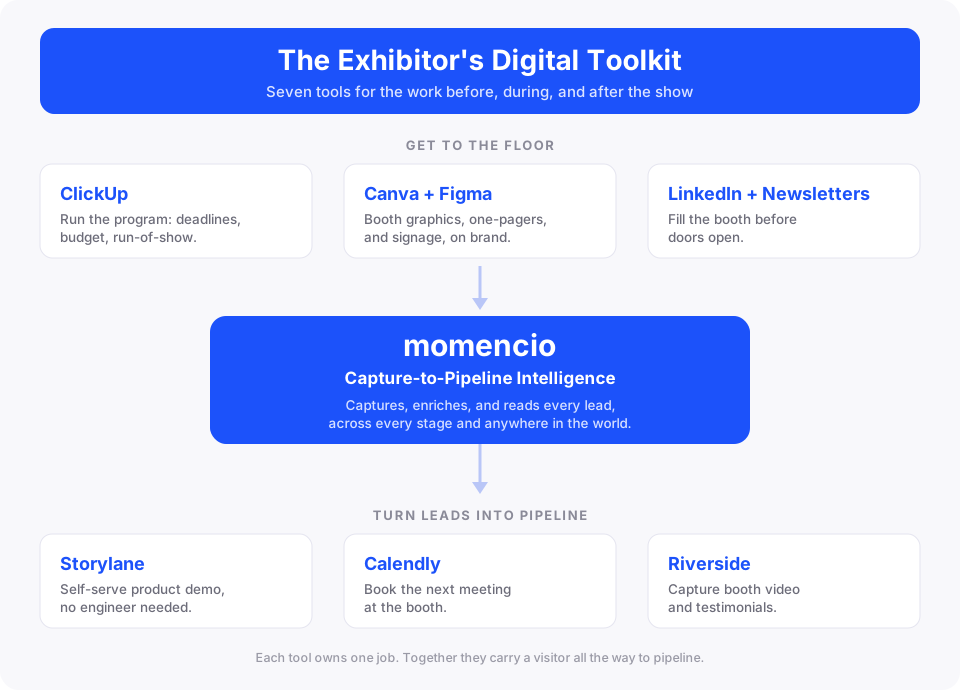
This guide covers the seven tools that close that gap. Each one owns a specific job across the work before, during, and after the show, and none of them overlaps with the others. Together, they turn booth traffic into pipeline your sales team can actually work.
Here is how the seven fit together across a show.
1. ClickUp: run the whole show without spreadsheet chaos
A trade show program is a project management problem before it is anything else. You are tracking exhibitor manual deadlines, advance warehouse cutoffs, booth graphics approvals, staff travel, printed collateral, and budget, often across several shows at once. The pain is rarely one dropped ball. It is the fragmentation, where marketing owns the graphics, sales owns the demo gear, and the office manager orders the giveaways, and nobody sees the whole timeline.
ClickUp gives that program a single home. Here is where it earns its place for a booth team:
- A Gantt or Timeline view for the countdown to show day, so booth graphics sign-off, the advance warehouse shipping date, staff travel, and collateral prints sit on one schedule with clear dependencies.
- Custom Fields for the budget by line item, covering booth space, drayage, travel, and printing, each with payment status and a progress bar, so you always know what is committed and what is left.
- Automations that fire deadline reminders, which matters most for the advance warehouse cutoff, the one date that quietly costs you when it slips.
- Docs for the run-of-show and vendor and sponsor details, plus a Dashboard that lets you watch several shows side by side.
ClickUp also ships an Event Marketing template built around the real phases of a show, covering planning and preparation, on-site operation, event day, and post event, with fields like Event Phase, Venue, and Prints already set up. A first-time exhibitor gets a running start instead of a blank workspace.
It runs the show and the team, and it never touches your lead data, which is a separate job later in this list.
2. Canva and Figma: booth graphics your team can actually produce
Booth graphics, one-pagers, social tiles, and signage all need to look sharp and stay on brand, and most teams do not have a designer sitting idle waiting for requests. Two tools cover the full range of that work, and most teams use both.
- Canva is the fast path: When you need a booth sign, a social graphic announcing your presence, or a one-pager in brand colors within the hour, Canva’s templates and drag-and-drop editor get a non-designer to a clean result quickly.
- Figma is the designer-grade option: For custom booth panels, precise layouts, and anything a professional designer will touch, Figma gives you components, shared design systems, and the control that Canva trades away for speed.
A tip worth setting up: if your team works in Figma, connect Claude through the Figma Connector in Claude’s settings, which takes a few clicks and no code. From there you can hand Claude a rough brief, loose notes, and screenshots of competitor booths, and ask it to map your booth’s visitor flow or your pre-show content plan into an editable FigJam board you can refine with the team. You can also paste a link to an existing booth graphic and ask Claude to review it against your brand and visual hierarchy before it goes to print, which catches the small problems that get expensive once a banner is printed.
These tools make the creative and nothing else, so they never step on the lead workflow.
3. LinkedIn and niche newsletters: fill the booth before doors open
Foot traffic is not luck. The exhibitors who stay busy are the ones who told the right people exactly where to find them, well before the show opened. Two channels do most of that work for a B2B audience.
- LinkedIn is the primary channel: Post from your company page and from your reps’ personal profiles with your booth number, who will be there, and what you are showing, then send direct messages to the target accounts you already know are attending. Personal posts from the people working the booth tend to travel further than a company announcement on its own.
- Niche newsletters are the second channel: Every industry has the newsletters its buyers actually read, and a placement or a mention in the right one puts you in front of the exact audience walking the floor. Choose newsletters by the vertical and the job titles your event attracts, since a focused industry newsletter that reaches the buyers you want will usually outperform a large general list for booth traffic.
This is attention before the show, and it brings people to the booth. What happens once they arrive belongs to the next tools.
4. momencio: Capture-to-pipeline intelligence
A badge scan gives you a name and a job title, and for most booth teams that is where lead capture stops. It is also why so many leads go cold. The rep who had the conversation moves on to the next visitor, the context disappears, and the follow-up becomes a Monday-morning data entry chore that happens too late to matter.
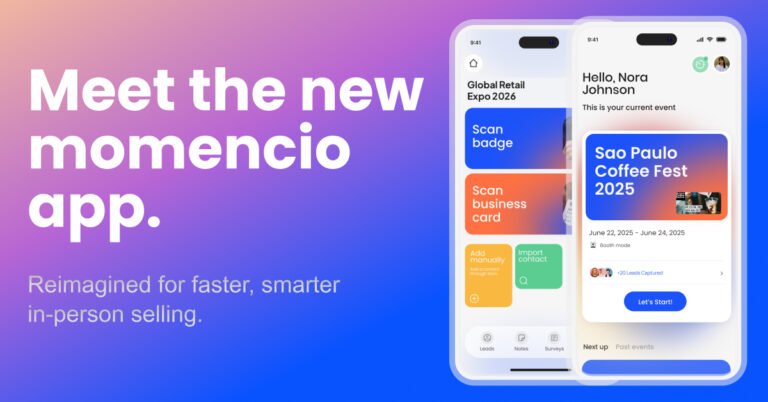
momencio is built for the job the badge scanner leaves unfinished. It is where lead capture meets live sales intelligence that drives results.
- AI EdgeCapture captures and enriches every lead at the point of contact, so the record you walk away with is fuller than a name on a badge and ready to act on.
- It surfaces live buyer signals while the show is still running, so your reps can see who is genuinely interested and act while intent is hot instead of guessing days later.
- LiveMicrosites follow up with pages tailored to what each lead cared about, and everything syncs to your CRM, so nothing sits in a spreadsheet waiting to be typed in.
- Event dashboards carry that intelligence forward after the show, so you can see which leads, reps, and events actually produced pipeline.
None of this is tied to the trade show floor. The same capture and intelligence works at a field meeting, an executive dinner, a partner event, or a remote conversation, anywhere in the world and across the full lifecycle of an event. One tool covers your whole program rather than a single booth.
The difference between a badge scan and this is easiest to see side by side.
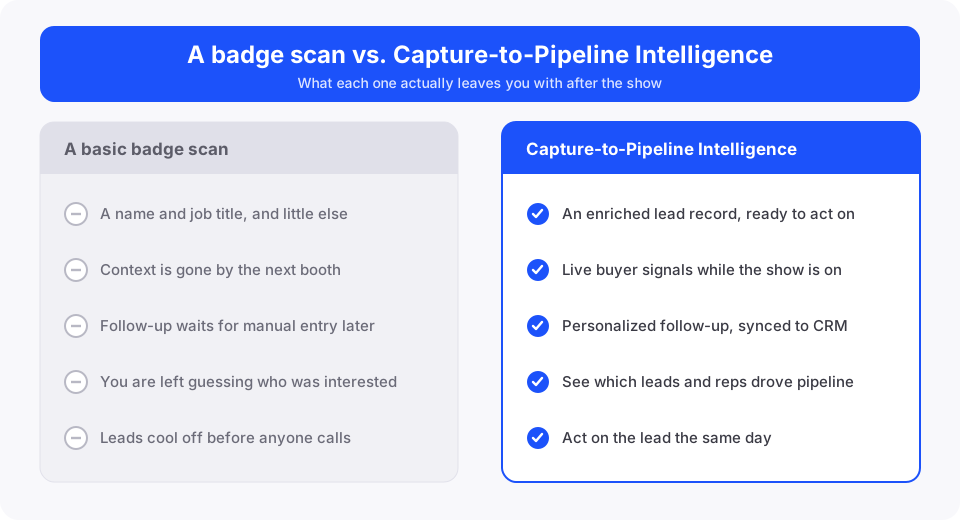
That is what lead capture with live sales intelligence that drives results looks like in practice: a qualified, enriched lead your team can act on the same day, with the context that makes the follow-up land. momencio is the hub the rest of this toolkit connects to, because the demo, the meeting, and the content that follow all work better when the lead behind them is captured, enriched, and understood.
5. Storylane: let prospects run the demo themselves
A live demo needs a sales engineer, a working setup, and a prospect with the time to stand and watch, and at a busy booth you rarely have all three at once. An interactive demo removes that dependency.
Storylane lets you capture your product with a browser extension and build a guided, clickable walkthrough with no code. Set it up on a booth tablet and a prospect can move through the product at their own pace, seeing the exact workflow that matters to them, without pulling a sales engineer off the floor. At a booth, that means a prospect who is curious but not ready to talk can still see your dashboard, your reporting flow, or the one feature they came to find, and leave having actually understood the product.
The same demo drops into your follow-up emails, so the people who showed interest can pick up where they left off. Storylane also tracks how each viewer engages and connects that activity to your CRM, which tells you who kept clicking after the show. It shows the product, and it leaves the capturing and the booking to the tools built for those jobs.
6. Calendly: book the meeting before they leave the booth
The worst place to lose a hot lead is the gap between a good booth conversation and the first real meeting. When that next step turns into a week of back-and-forth email, the momentum is gone.
Calendly closes that gap. Share a booking link, put it on a QR code at the booth or send it on the spot, and the prospect picks a slot from your live availability while the conversation is still fresh. For a booth team, the QR code on the counter does the work: a prospect scans it, sees open times, and books a fifteen-minute follow-up before they walk to the next stand.
It syncs with your team’s calendars to prevent double bookings, uses round-robin and routing rules to send each lead to the right rep, and sends automated reminders that cut no-shows. The meeting lands on the calendar before the prospect has left your booth. Calendly books the meeting and stops there, picking up right where lead capture ends.
7. Riverside: turn booth moments into content that keeps selling
A trade show puts customers, partners, and experts in one place for a few days, and most of that raw material for content walks out the door unrecorded. Capturing even a few conversations gives you weeks of content after the show.
Riverside is a browser-based recording studio that captures high-quality video and audio, recording locally so quality holds up even on shaky venue internet. Use it to record customer testimonials, short product explainers, or quick interviews with partners and speakers right at your booth, from a laptop or the mobile app. Its AI tools then turn each recording into short clips, transcripts, and captions, so a ten-minute booth interview becomes a week of social posts and follow-up material.
A customer who stops by and shares a quick win on camera gives you social proof that is hard to manufacture any other way, and Riverside makes capturing it a two-minute ask at the booth. You can even stream a booth session live to LinkedIn or YouTube to reach the people who could not attend. Riverside handles content capture, a job no other tool here touches, so it rounds out the toolkit without stepping on anything else.
Build the toolkit as a system
The value of these seven tools is in how they connect. ClickUp runs the program, Canva and Figma make the creative, and LinkedIn and niche newsletters fill the booth. momencio then captures, enriches, and reads every lead, while Storylane, Calendly, and Riverside build on those captured leads and move them toward pipeline.
The tool that ties the system together is the one that turns a booth visitor into a lead you can act on, and that is momencio. See what Capture-to-Pipeline Intelligence looks like on your own leads, and book a momencio demo.