
Every exhibitor makes the same decision before a show – how visitors will take information away from the booth. Product sheets, case studies, pricing guides and demo videos all need a way to reach people, and the method a team chooses shapes what the event costs, what each visitor leaves with and what the team knows once the show is over.
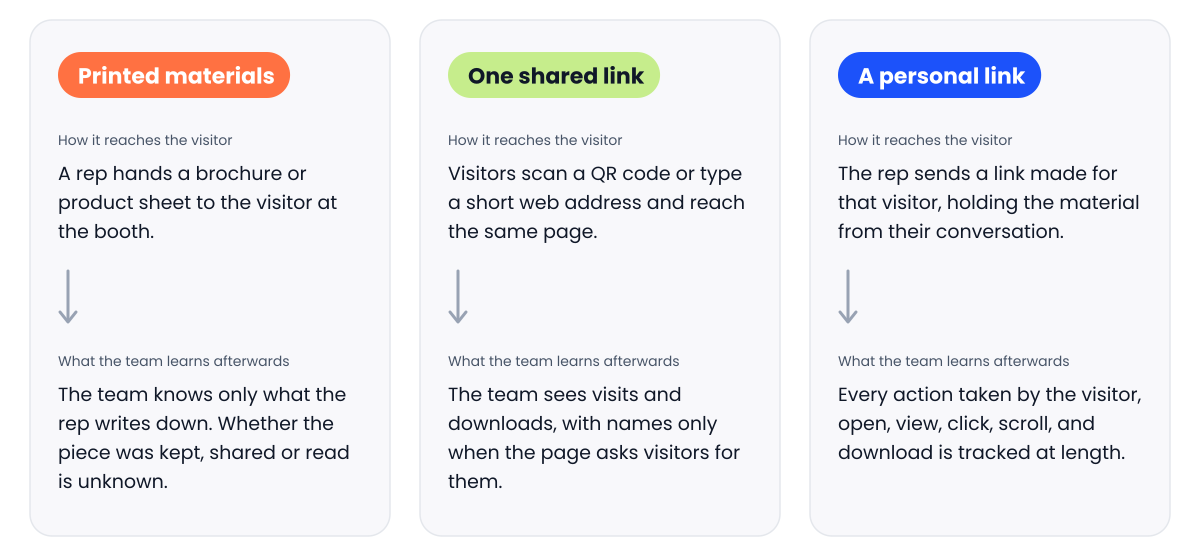
There are three common ways to share trade show collateral, and they can be combined: printed materials, one shared link for every visitor, and a personal link for each visitor. This guide sets out the facts for each, so you can choose what suits each event.
Printed materials
Brochures, one-pagers, spec sheets and catalogues are the longest-standing way to share information at a booth. A visitor can hold a printed piece, take it back to the office and pass it to a colleague, with no phone, signal or download involved.
Paper also tends to hold people’s attention. Research comparing paper and digital advertising found that people spent longer with paper ads, had a stronger emotional response to them and remembered them better.
The costs sit in design, printing, shipping and storage, along with the time someone spends ordering stock, packing boxes and carrying them to the stand. Design costs stay the same at every size of event, so at a table-top show or a roadshow, where fewer visitors pass by, each printed piece carries more of that cost. Printed material also dates, because a new product, a price change or a fresh case study can make stock out of date before it has all been handed out.
Once a brochure leaves the booth, the team cannot tell whether it was kept, passed on or read. The only record is what a rep writes down during the conversation, and the details of what was discussed stay with the people who staffed the booth.
One shared link for all visitors
The second way puts a single link in front of every visitor, usually as a QR code or a short web address on a booth sign, a screen or a table card. Everyone who scans it or types it in reaches the same page, where they can view or download the material.
Because the page behind the link can be changed at any time, the material stays current, and there is nothing to ship. A link only needs a phone, and around nine in ten US adults own a smartphone. The costs are small: a landing page, the code or sign at the booth, and someone to keep the page up to date.
What the team learns depends on what the page asks for. If the page shows the material freely, the team can count visits and downloads without knowing who made them. If it asks for a name and email first, each download can be matched to a person and recorded in your CRM, where it can later be connected to deals. In both cases, the record depends on each visitor taking those steps, and it captures the download without the conversation that led to it.
A personalized link for each visitor
The third way starts with the conversation. Once the rep knows who the visitor is, usually by scanning a badge or business card, they send that visitor a link made for them alone, holding the material that came up while they talked. It can reach the visitor before they have left the booth.
Because the link belongs to one named person, everything they do with it can be recorded against their name, including each open, view, click, download and return visit. The material can also be updated after it is sent, so a visitor who opens the link weeks later sees the current version. The costs are a tool that creates and tracks these links, and a few seconds at the booth to capture who the visitor is.
This record shows the rep what each visitor opened before they follow up, and it shows the team which material visitors actually use. It also sits with the lead, next to the rep’s notes from the booth, so the conversation and everything that happened after it stay together.
This is the way momencio is built to work. Reps share a LiveMicrosite, a personal page for each visitor drawn from the team’s content library, and can send it before the visitor leaves the booth. IntelliStream logs every view, click, scroll and download against that contact, and the lead, including its interactions and survey answers, syncs with your CRM. When Rajant moved its event collateral to digital, it saw a 63% open rate after the show.
To see how a personal link works at a live event, book a walkthrough with the momencio team.
What each way leaves you with
The table below sets out the three ways side by side.
| Printed materials | One shared link | A personal link | |
| What the visitor takes away | A printed piece to keep or pass on | The same page or download as every other visitor | A page holding the material from their own conversation |
| What it takes to run | Design, printing, shipping, storage and someone to manage stock | A landing page and a code or short web address at the booth | A tool that creates personal links, and a quick capture of who the visitor is |
| Keeping material current | Reprinting whenever something changes | Editing the page at any time | Editing the material at any time, even after it has been sent |
| What the team learns afterwards | What reps noted during conversations | Visit and download counts, with names when the page asks for them | Each open, view, click and download, recorded against the visitor’s name |
| What reaches your CRM | Whatever reps enter by hand | Downloads, when the page collects visitor details | The lead and its interactions, when the tool syncs with your CRM |
Choosing the right mix for each event
The three ways can work side by side at the same event, and the right mix depends on the show. A few questions make the choice easier:
- Who will visit the booth, and how will they share what they take with colleagues?
- What will the team need to know after the show, and who will need to know it?
- How often does the material change?
- How many visitors will the event bring, and how much stock is worth carrying to it?
Deciding before the show what the team needs to learn afterwards, and how you will report the return on the event, often makes the rest of the choice clear, because each way leaves a different record.
Frequently asked questions
- What is trade show collateral?
- Trade show collateral is the material an exhibitor shares with booth visitors to explain its company and products, such as brochures, product sheets, case studies, pricing guides and demo videos. It can be printed, shared through a link or both.
- Can a QR code show who downloaded my material?
- It can, if the page behind it asks visitors for their details. A QR code sends every visitor to the same page, so unless the page has a form, the team sees how many people visited without knowing who they were. A personal link records activity against each named visitor from the start.
- Is printed collateral still worth bringing to a booth?
- It can be, particularly for visitors who prefer paper or want something to pass to colleagues, and paper tends to be remembered well. The trade-offs are the cost and the lack of a record, so it helps to decide which pieces truly need to be on paper.
- How can I tell whether my trade show collateral worked?
- Look at what happened after the show: who opened the material, what they opened and whether those visitors went on to speak with sales. Printed material leaves what reps noted, a shared link shows visits and downloads, and a personal link shows each visitor’s activity. Our guide to connecting trade show activity to deals covers the next step, and what visitors do with your material after a show looks at what happens once it reaches them.