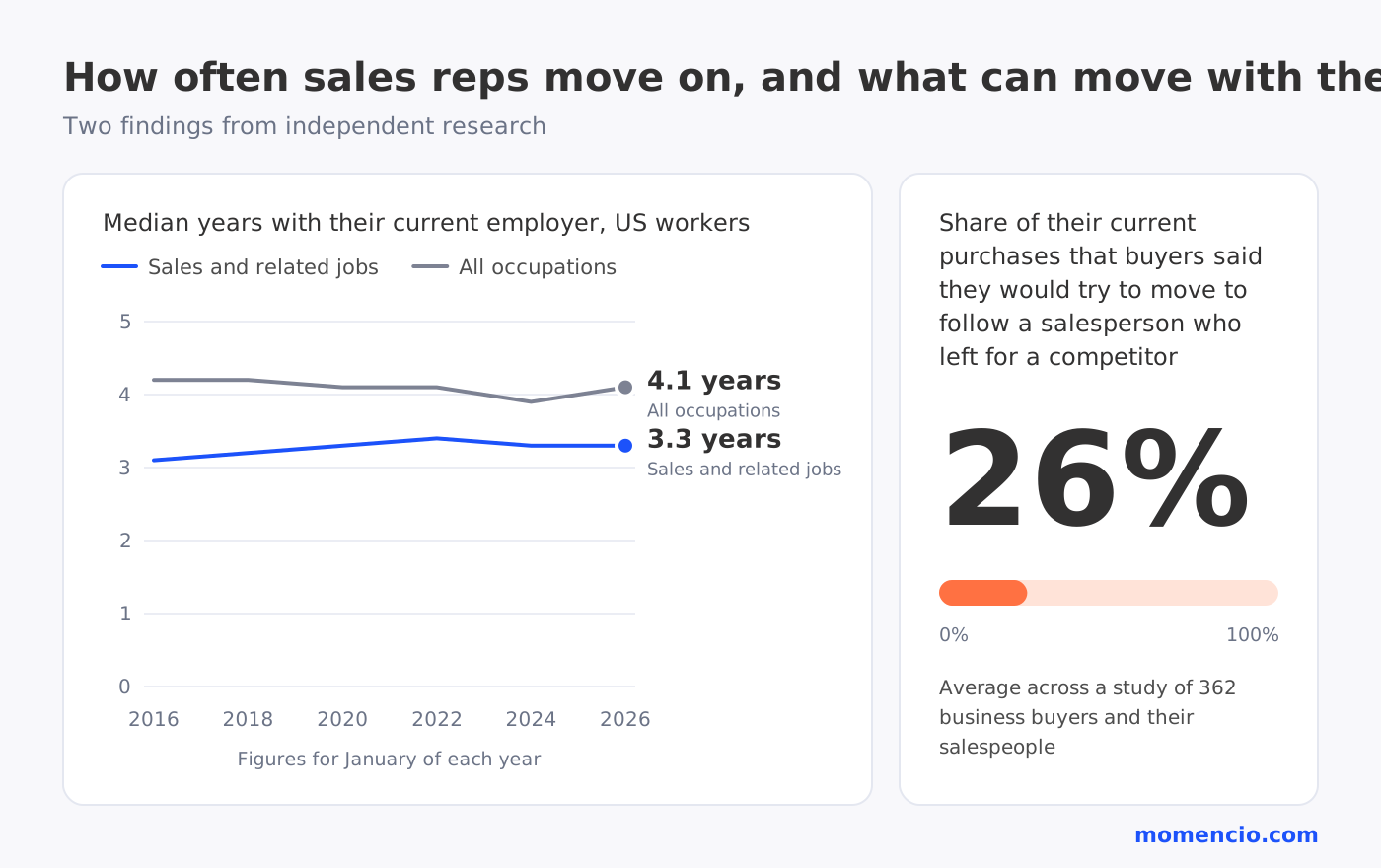
Sales teams change more often than most event plans allow for. In January 2026, half of all US workers in sales and related jobs had been with their current employer for 3.3 years or less, compared with 4.1 years across all occupations. For a company that exhibits at several shows a year, the rep who meets a buyer at one show may have moved on by the time that buyer is ready to talk.
When that happens, a simple question follows: what happens to the people that rep met? The answer depends on where those conversations were kept.
What leaves with a sales rep
A rep comes back from a trade show with business cards, phone contacts and conversations that live mostly in their memory. Over a few shows, those collect in places only the rep can reach:
- Business cards in a bag or a desk drawer, some with notes written on the back
- Contacts saved on the rep’s own phone
- Notes in a notebook or a notes app
- Follow-up emails and replies in their inbox, where no one else on the team can see them
- What each buyer said, asked for and was promised, remembered by the rep and never written down
Each of these sits with one person. When that person leaves, the record of what those shows produced can leave with them, even though the company paid for the booth, the travel and the time.
Why the relationship can follow the rep
The contact details are only part of what is at stake. Buyers build a relationship with the person they met, and that relationship carries real commercial weight.
In a study of 362 business buyers and their salespeople, buyers said they would try to move an average of 26% of their current purchases to follow a salesperson who left for a competitor. Sales also grew more slowly with customers whose salesperson had moved to a competitor.
A trade show conversation is often where that kind of relationship starts. If everything the buyer shared sits with the rep who heard it, the next person has to begin again, and the buyer has to explain their needs a second time.
What stays with the company when conversations are captured in momencio
momencio captures in-person conversations, at trade shows and in field meetings, in the company’s own momencio account. Every contact a rep captures carries a record of that conversation:
- Who the buyer is: the rep scans a badge or a business card, and AI EdgeCapture™ fills in missing contact details.
- What they said: notes, tags, answers to the questions you set for the event, and voice notes recorded at the booth.
- What they received: the follow-up email sent from the booth, and any live microsite shared with them.
- What they did next: the follow-up pages they opened, kept in each contact’s history.
- What was agreed: meetings the buyer booked from the rep’s digital business card, in the calendar connected to momencio.
- Where it came from: the event where the conversation took place and the rep who captured it, which the event dashboard shows for every show.
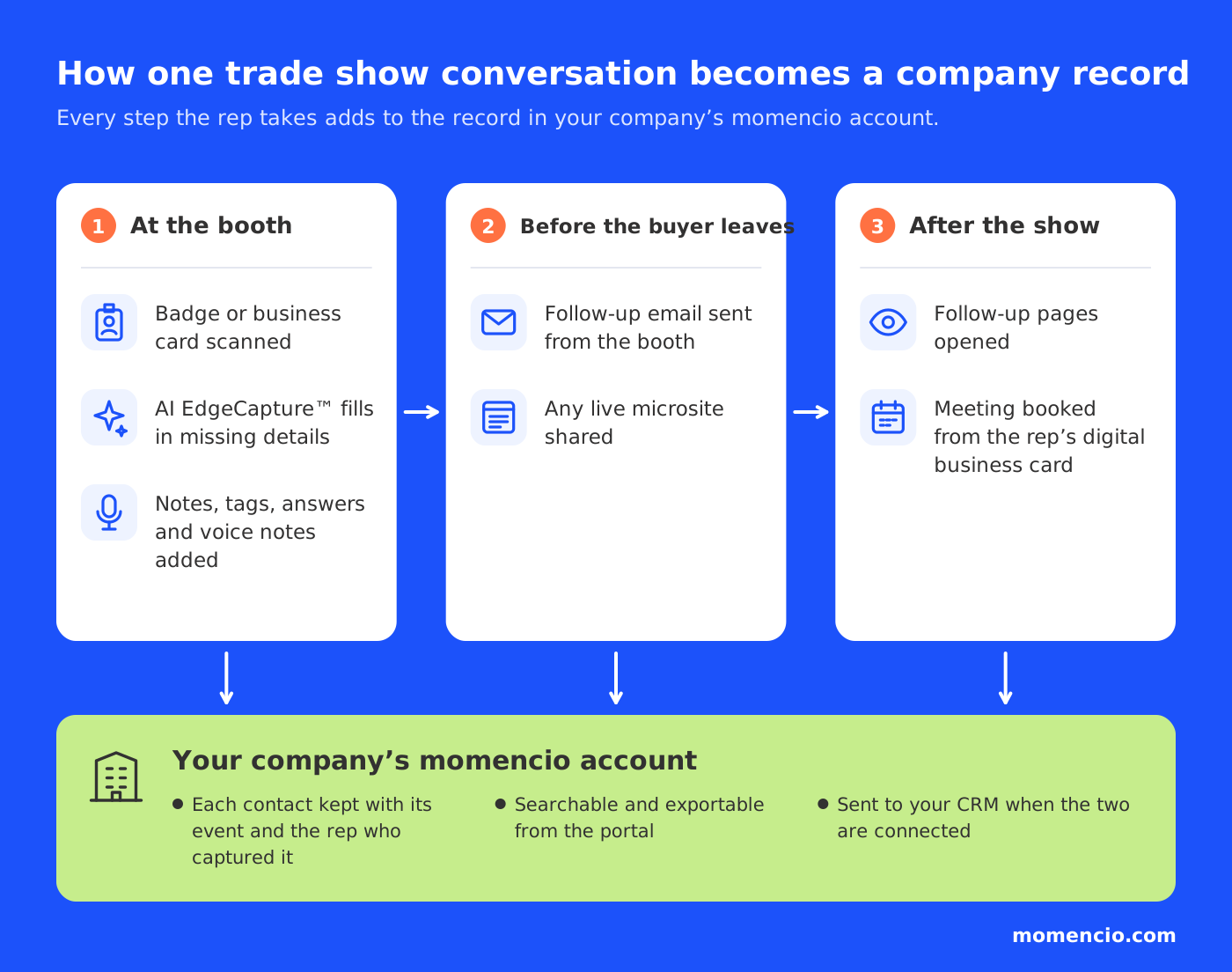
All of this sits in the company’s momencio portal, where it can be searched and exported. If your CRM is connected to momencio, the contacts reach it as well. When a rep leaves, their conversations are already in the company’s account.
How to hand over a departing rep’s trade show contacts
When a rep hands in their notice, a short handover keeps every open conversation moving.
1. Find everything the rep captured
In the momencio portal, look up the contacts from each event the rep worked, along with their notes and the follow-ups that went out.
2. Sort the open conversations
Start with buyers who booked a meeting or opened their follow-up pages, then move on to the ones who have not replied yet. Contacts with no agreed next step can come last.
3. Give each open conversation one owner
Assign every open conversation to one named person, by account or territory, so nobody assumes someone else has it. Leads tend to get dropped when no one owns them.
4. Read the history before reaching out
The new owner should read the notes and voice notes, the answers the buyer gave, what the buyer received and which pages they opened. Their first message can then pick up from the original conversation.
5. Introduce the new owner
Send a short note that mentions the show, what the buyer was interested in and what was promised, and offer the next step. The buyer should not have to explain their needs again.
6. Remove the departing rep’s access
Close the rep’s access to momencio as part of their exit, as you would for any company system.

Prepare every show so a handover is always ready
The easiest handover is the one prepared at the booth. A few habits at every show keep each conversation ready to pass on at any time:
- Set up each event in momencio with the questions and tags your team needs, so every conversation is recorded the same way.
- Add a note or a voice note to each contact before the next conversation starts.
- Send the follow-up from the booth, so the first message is on record from day one.
- Book the next meeting from the rep’s digital business card, so the next step is agreed and in the calendar.
- Connect your CRM if you use one, so the record also sits where your sales team works.
The same applies beyond trade shows. When reps capture customer visits and field meetings in momencio, every in-person conversation is kept in the company’s account, wherever it took place.
Frequently asked questions
- What happens to a sales rep’s trade show contacts when they leave the company?
- It depends on where the contacts were kept. Business cards and contacts saved on a personal phone usually leave with the rep, and the context in their inbox is hard for anyone else to find. Contacts captured in momencio are in the company’s account, with their notes, follow-ups and history.
- Who should take over a departing rep’s trade show contacts?
- Give each open conversation one named owner, chosen by account or territory, and ask them to read the conversation history before they reach out.
- What should a new rep read before contacting a buyer someone else met?
- Do business cards scanned into momencio stay with the company?
- Yes. A scanned business card becomes a contact in the company’s momencio account, together with any notes the rep added.
Keep every in-person conversation with your company
momencio keeps in-person conversations, from trade shows to field meetings, in one account your company owns. A demo is the quickest way to see how it would fit your team and how to get the most out of it, so book a demo when you are ready.