
Most writing about lost deal context assumes the rep forgot. Sometimes that is true. More often the note was written, the survey answer was recorded, the next step was agreed, and none of it reached the person who eventually made the call.
Context does not evaporate on the flight home. It gets detached from the record, one handoff at a time, by systems doing exactly what they were configured to do.
Event lead enrichment sits at the center of this for a reason that rarely gets stated. Enrichment is usually sold as a completeness feature, something that fills empty fields. Inside a CRM it does something more structural. It supplies the identity that everything else attaches to. Get the identity wrong and your matching rules cannot place the record, routing cannot assign it, and the conversation your rep captured ends up somewhere nobody will look.
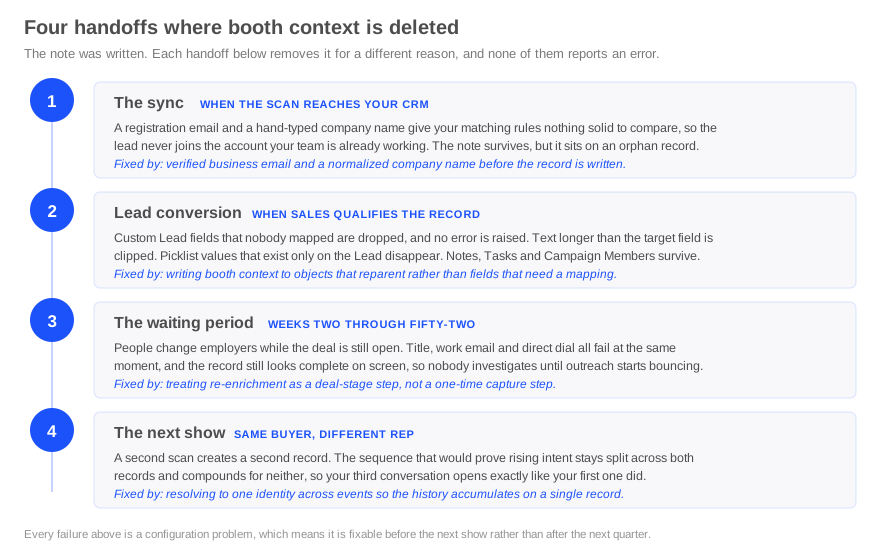
This article is written for whoever owns the CRM configuration behind an event program. It covers the four points where booth context is deleted after a show, what fails at each one, and which of those failures enrichment actually solves.
Deal context is three data types, and your CRM loses them in three different places
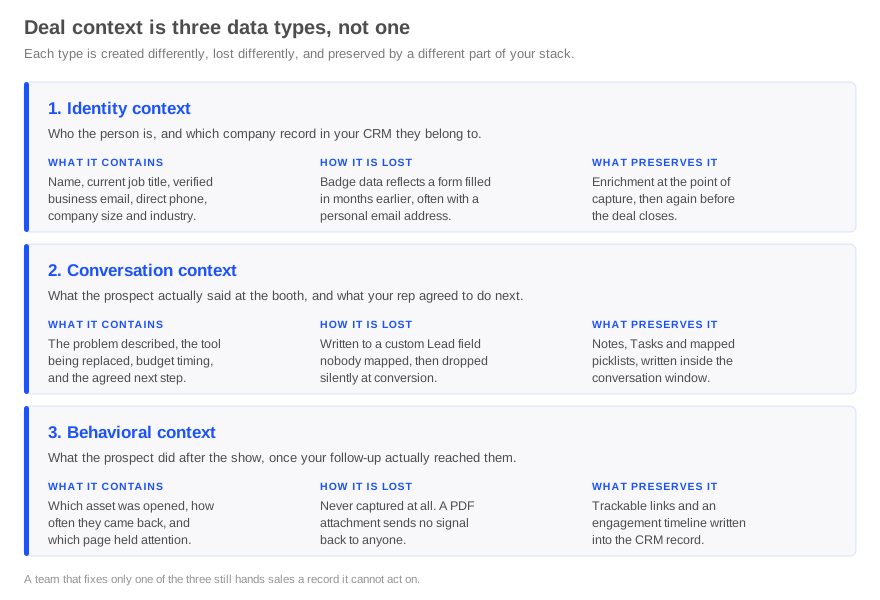
Teams talk about context as one thing. Your CRM does not store it as one thing, and the three types fail independently of each other.
Identity context is who the person is and which company record they belong to. It arrives from the badge, which reflects a registration form completed weeks or months before the show.
Conversation context is what the prospect said at the booth, covering the problem they described, the system they are replacing, the timing they gave you, and the next step your rep agreed to.
Behavioral context is what they did after the show, once your follow-up reached them, including which asset they opened, how often they came back, and which section held their attention.
Each one fails for a different reason. Identity context goes stale at the source, before anyone in your company touches it. Conversation context is usually lost inside the CRM at field mapping. Behavioral context tends not to exist in the first place, because a PDF attachment reports nothing back to anyone.
The practical consequence is that a team fixing one of the three still hands sales a record it cannot act on. Enrichment addresses the first. It does not address the other two, and any vendor implying otherwise is overselling.
Handoff one, the sync, where enrichment either places the record or strands it
This is the handoff that connects enrichment to deal context directly, and it is the one almost nobody writes about.
What your matching rules actually compare
In Salesforce, matching rules define which fields are compared and whether the comparison is exact or fuzzy. Duplicate rules then decide when those comparisons run and what happens when a match is found. They are separate objects and both have to be configured before anything happens.
The standard Lead matching rule compares company, first name, last name, and email. The standard Contact matching rule compares first name, last name, email, and phone, with email carrying the most weight. The standard Account matching rule compares account name and billing street using fuzzy logic.
Every one of those comparisons depends on identity fields that a raw badge scan supplies badly.
Why a registration email breaks lead to account matching
When an attendee registers with a personal address, your email comparison has nothing to work against. Email is the strongest field in both the Lead and Contact matching rules, so losing it removes the most reliable path to a match in a single step.
Company name behaves the same way. Someone who types Corp against an account record that reads Corp Inc. will often clear the default fuzzy threshold as a different organization. Regional and subsidiary variants create the same result, so a scan from a division of an existing customer can read as a company you have never sold to.
What follows is a new record with no relationship to the account your team is already working. The booth note and the survey answers both survive the sync perfectly well, but they are attached to an orphan the account owner has no reason to open, and your event report counts it as a fresh lead rather than movement on an existing opportunity.
This is what event lead enrichment actually buys you at the CRM layer. A verified business email and a normalized company name are the inputs your matching rules need in order to attach the conversation to the account it belongs to. Routing, alerting, and campaign attribution all sit downstream of that resolution happening correctly at the moment the record is written.
The setting most teams have never checked
Duplicate rules carry separate settings for records created through the API. A large share of organizations leave those unchecked, which means integrations and bulk imports bypass duplicate checking entirely.
Event lead capture syncs through the API. If your duplicate rules are active in the interface but inactive for records created programmatically, your show generates duplicates at precisely the moment your identity data is at its weakest.
Open Setup and confirm this before your next event rather than after it. The pre-show data handoff checklist covers the remaining tests worth running while there is still time to change the configuration.
Handoff two, lead conversion, where context disappears without an error
The first handoff decides where the record lands, and this one determines how much of that record is still readable by the time sales opens it.
What moves across and what does not
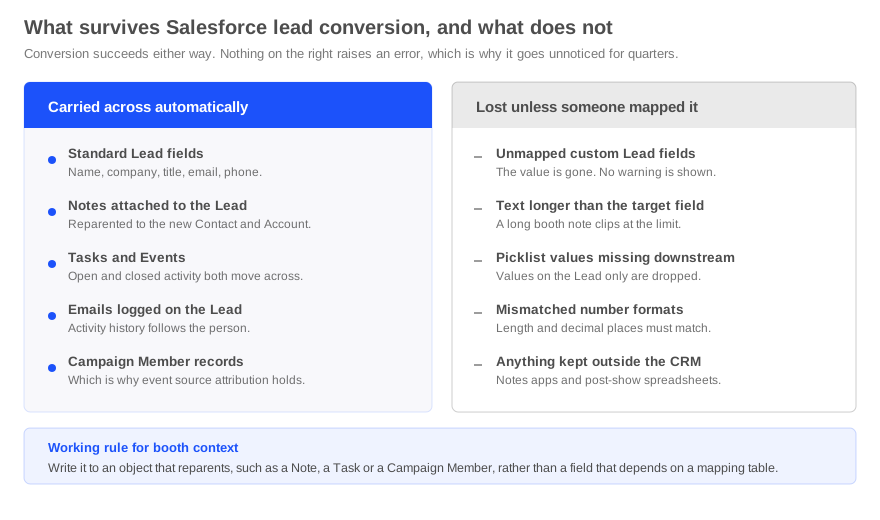
When a Lead converts, information from standard Lead fields lands in the corresponding standard fields on the Account, Contact, and Opportunity. Custom Lead fields do not behave this way. They move only if an administrator mapped them, and if nobody did, their values do not survive the conversion.
Related records behave differently again. Tasks, Events, Notes, and Emails attached to the Lead are reparented to the new Contact and to the Account or Opportunity, so activity history follows the person. Campaign Member records are updated to point at the new Contact, which is why event source attribution usually survives even when field data does not.
The useful question, then, is not whether your team captured booth context. It is which object they wrote it to.
The failures that produce no error message
Unmapped custom fields raise no error. The conversion succeeds and the value is simply absent afterward, which is how this survives undetected across several quarters and several shows.
Three related failures behave the same way. Custom number, currency, and percent fields have to match the target field for length and decimal places or the mapping is rejected outright. Picklist values that exist on the Lead but not on the target object are dropped. A long conversation note mapped into a shorter target field clips at the character limit rather than warning anyone.
Salesforce publishes the full set of constraints in its guidelines for mapping custom lead fields for lead conversion, which is worth reading next to your own mapping table rather than after a bad quarter.
Where to write booth context so it survives
Three rules follow, and all three are configuration decisions rather than training problems.
Write the conversation summary as a Note or a Task on the Lead rather than into a custom long text field, because those objects are reparented automatically while an unmapped field simply stops existing.
Keep structured qualification answers in mapped picklists, and audit the value sets on both objects whenever either one changes. A value added on the Lead side and not on the Contact side fails silently from that day forward, and nothing in the interface will tell you.
Attach event source to the Campaign Member record rather than a custom field, so attribution survives conversion without depending on a mapping table staying correct through staff turnover.
Our CRM mapping guide for trade shows covers which objects and fields to use for score, intent, asset engagement, and timing, including the picklist structures worth standardizing before the season opens.
Handoff three, the job title your CRM believes
Badge data describes the person as they were when they registered. For a show with a long registration window, that snapshot can be several months old before anyone scans it.
Sales then calls a director who has since become a VP, or treats someone as the economic buyer when they moved into an adjacent function last quarter. The conversation context was captured correctly. The identity attached to it was already out of date.
This is a different failure from poor data quality, and separating the two matters in your own diagnosis. The badge may have been perfectly accurate on the day it was printed. Accuracy at registration and accuracy at follow-up are two different measurements, and only the second one affects pipeline.
Enrichment resolves this by returning the current role from live public sources at the moment of capture rather than trusting the registered one. It also gives you a detection method, because a badge title that disagrees with the enriched title is a useful signal on its own. Our piece on what enrichment gives you beyond a corrected email address covers how field teams put that disagreement to work while the person is still standing there.
Handoff four, decay across the length of the sales cycle
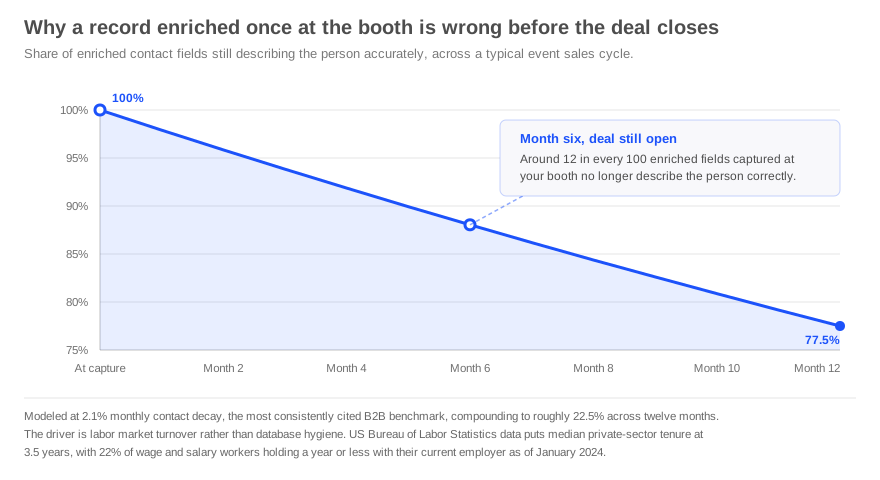
Enriching at the point of capture solves accuracy on day one. Event-sourced deals routinely close six to eighteen months later.
The driver is labor market turnover rather than database hygiene, which is worth stating because almost every published decay percentage comes from a company that sells enrichment. The primary source is more useful. The US Bureau of Labor Statistics reports median tenure in the private sector at 3.5 years, and that 22 percent of wage and salary workers had been with their current employer for a year or less as of January 2024.
Read that against an event pipeline. On a twelve-month cycle, roughly a fifth of the people in your post-show database will have changed employer before the deal closes. When that happens, title, work email, and direct dial fail together rather than one at a time, and the record still displays as complete on screen, so nobody investigates until outreach starts bouncing.
The operational consequence is straightforward. Re-enrichment belongs in your deal stage criteria, not only in your capture workflow. A workable default is to re-enrich any event-sourced record when it advances to a later stage, and to re-enrich the whole show cohort before any nurture campaign built on that list goes out.
The multi-event problem, where context fragments instead of compounding
A buyer evaluating a category attends several shows in a year, gets scanned by a different rep at each one, and frequently ends up as several separate records that cannot see each other.
Each record carries a fragment. None carries the sequence, and the sequence is the part with commercial value, because the second and third conversations are where rising intent becomes visible.
For a CRM owner this appears as a reporting problem before it appears as a revenue problem. Your event dashboard counts three new leads across three shows, while your pipeline shows a single account with no visible pattern of engagement. Both readings are technically correct, and neither one tells anybody what to do next.
Resolving to a single normalized identity is what turns three fragments into one history, and it is the reason enrichment quality compounds across a season rather than helping once per show.
What event lead enrichment cannot do
Worth saying plainly, because the category consistently oversells this point.
Enrichment resolves identity. It returns verified contact details, a current role, and company attributes, and it makes those values consistent enough for a CRM to act on. That is a narrower job than the marketing around it usually suggests.
What it does not know is anything that happened in the conversation, including the problem they described, the competitor they mentioned, and what your rep promised to send. No enrichment provider can recover a conversation that was never recorded anywhere.
If your booth workflow produces no note, no survey answer, and no agreed next step, enrichment gives you a clean record with nothing in it. That is a better starting point than a dirty record with nothing in it, and it is not the same as having context. The mechanics of capturing what was actually said at the booth are a separate discipline with a separate failure mode.
The honest division of labor is that capture creates context, enrichment protects it by making sure it attaches to the right record, and engagement tracking extends it after the show.
A ninety-minute audit before your next show
Run this while there is still time to change the configuration.
- Pull twenty leads from your last event and check how many matched an existing account. A low rate points at identity quality rather than routing logic.
- Open your duplicate rules and confirm the API setting. If records created through integrations bypass duplicate checking, your event sync is generating duplicates by design.
- List the custom Lead fields your booth workflow writes to, then open your lead field mapping table. Anything present in the first list and missing from the second is being deleted at conversion.
- Compare field lengths for every mapped text field. A source field longer than its target means silent truncation of exactly the notes you most want to keep.
- Compare picklist value sets across both objects. Values that exist only on the Lead are dropped without notice.
- Convert one test lead end to end and read the resulting Contact and Opportunity. This is the only step that proves the previous five.
- Check whether campaign member status is being written for your event campaign. A blank status means attribution is already broken before the show starts.
Most teams find at least two live failures in this list. All seven are configuration problems, which is the good news, because it means they are fixable before the next show rather than after the next quarter. Our CRM best practices for event leads covers the ownership and routing decisions that sit alongside these checks.
How momencio handles the identity layer
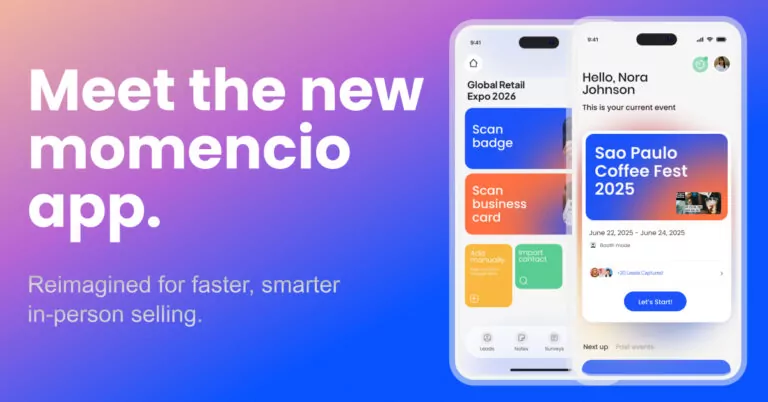
momencio’s AI EdgeCapture™ runs enrichment across more than twenty verified data sources at the point of capture, returning business email, direct phone, job title, company size, industry, and LinkedIn profile. It runs before the show against uploaded lists, on the floor at the moment of the scan, and afterward through the web portal for records that came back incomplete, which is what makes the re-enrichment habit described above practical rather than aspirational.
That is the identity layer. Alongside it, Smart Notes captures what was actually said, by voice or text with tags, during the event itself, and surveys built around your ICP capture structured qualification answers that feed each lead’s score. IntelliStream™ extends the record after the show with engagement signals, and AI IntelliSense™ scores that behavior against your ICP.
For a CRM owner, the part that matters is what reaches the system of record. The sync carries the enriched profile, the qualification score, survey answers, smart notes, email activity, and LiveMicrosites™ engagement, mapped to fields, owner, and campaign, rather than a contact record with everything else left behind. Salesforce and HubSpot integrations are native, more than one CRM can run at the same time, and capture works offline with local storage and sync on reconnect, which matters at venues where connectivity is unreliable.
The wider picture of how capture, enrichment, and engagement connect sits in the event lead capture overview, and the evaluation criteria are covered in our buyer’s guide to lead retrieval apps.
Frequently asked questions
- What is event lead enrichment?
- Event lead enrichment is the process of taking the limited data a badge scan or business card returns and completing it with verified, current information about the person and their company. It matters more at events than in most channels because badge data reflects a registration form completed weeks or months earlier and frequently carries a personal email address, a self-reported job title, and an inconsistent company name.
- Does lead enrichment capture what was discussed at the booth?
- Why do trade show leads create duplicate records in Salesforce?
- Two causes usually combine. Badge data often lacks a business email, which is the strongest field in the standard Lead and Contact matching rules, and company names entered at registration rarely match account records exactly. Separately, many organizations leave duplicate rules inactive for records created through the API, which is how event lead capture platforms write data, so the checks never run at all.
- What happens to booth notes when a Salesforce lead is converted?
- It depends entirely on where the note was stored. Notes, Tasks, Events, and Emails attached to the Lead are reparented to the new Contact and to the Account or Opportunity. Custom Lead fields are carried across only if an administrator mapped them, and unmapped fields lose their values without producing an error.
- How often should event leads be re-enriched?
- At minimum, before any nurture campaign built on the show list goes out, and again when a record advances to a later deal stage. Event-sourced deals often run six to eighteen months, and with more than a fifth of workers changing employer within a year, a record enriched only at capture is measurably wrong by the middle of the cycle.
- Where should booth conversation context be stored in a CRM?
- In objects that reparent automatically at conversion. A Note or Task for the conversation summary, mapped picklists for structured qualification answers, and the Campaign Member record for event source. Custom long text fields on the Lead are the least safe option, because they depend on a mapping table that few teams audit.
- Does enrichment fix a bad badge scan?
- It corrects and completes the record wherever public data allows, which covers most cases. It performs less well against private LinkedIn profiles, very small companies with limited online presence, self-employed individuals, and security-sensitive sectors. Treating enrichment output as reliable but not infallible, and verifying before high-value outreach, is the sensible operating assumption.