Trade show lead capture does not start and end at the booth. A visitor walks up, a rep scans the badge, adds a note, and the lead goes into the post-event pile. That process feels normal because it is how event teams have worked for years.
The problem is that real buying interest does not follow that neat little path. People hear about you in sessions, bump into your team at dinners, scan QR codes when the booth is busy, open follow-up links after hours, and come back to the same content when they are finally ready to talk. If your lead capture workflow only sees the badge scan, it misses the moments before and after that scan where intent is often much clearer.
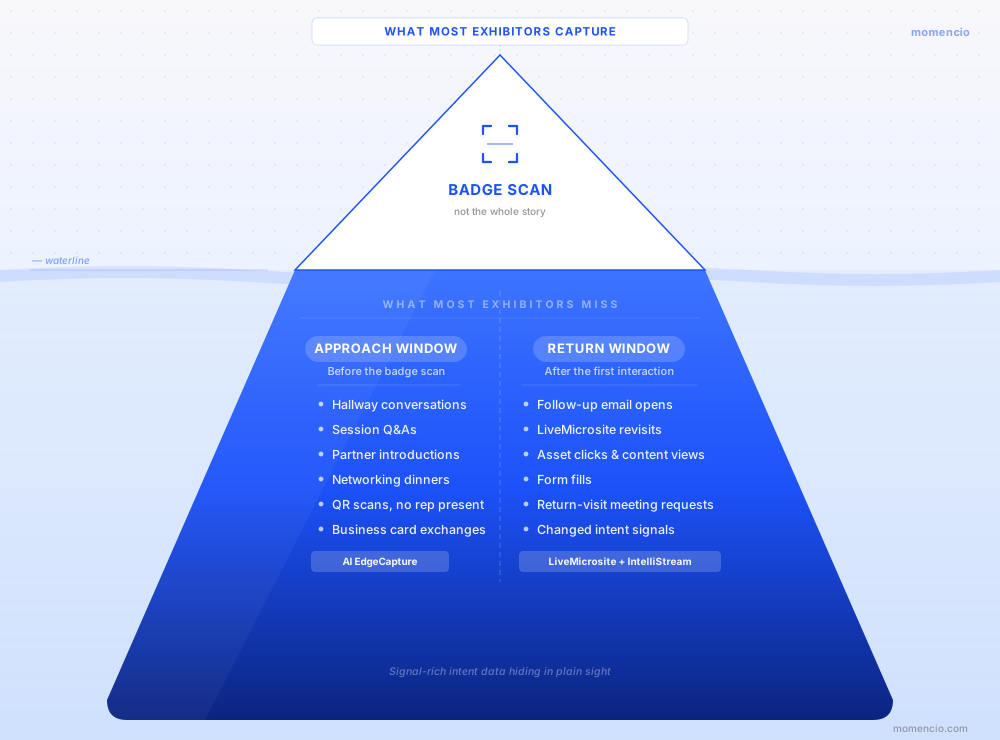
There are two lead capture windows at almost every trade show that exhibitors leave empty. The first happens before someone becomes an official booth lead. The second happens after the first conversation, when the lead keeps researching but your team is no longer watching. Filling those windows is not about collecting more names. It is about catching the signals your competitors usually ignore.
TL;DR
The two missed lead capture windows are the approach window and the return window. The approach window includes the conversations and signals that happen before a booth scan, such as hallway chats, session questions, partner introductions, networking dinners, and self-guided QR activity. The return window includes everything the lead does after the first interaction, such as opening follow-up content, revisiting a personalized page, clicking a specific asset, or asking for the next step. A strong event workflow captures both windows, connects them to the same person, and gives sales enough context to act without waiting for a spreadsheet cleanup project.
Why the badge scan is only the middle of the story
A badge scan is useful. It gives your team a clean starting point and helps avoid the old pile of business cards at the bottom of someone’s bag. But it is still just one moment in a longer journey.
At a busy trade show, a buyer might first notice your brand during a panel where your speaker answers a question. Later, they walk past your booth but do not stop because the demo area is crowded. At lunch, they ask one of your reps a question. That evening, they search your company on their phone. The next morning, they finally stop by the booth and get scanned.
In a basic booth-only system, all of that early movement disappears. The CRM sees a new contact from the show, but it does not know what warmed that person up, who spoke to them first, or what they were already trying to solve.
That is why the event team needs a wider capture model. The booth scan is the middle. The useful context often sits on both sides of it.
Window one is the approach window
The approach window is everything that happens before a person becomes an official booth lead. It is easy to miss because it often happens outside the place where your team expects capture to happen.
This includes the quick conversation after a session, the intro from a partner, the prospect who asks for your card at a networking breakfast, the buyer who scans a poster QR code while the booth team is busy, or the person who says, “I will come back later,” and then never gets a chance. None of these moments look like a classic booth scan, but several of them can be better than a random scan because the person is already giving you a reason to follow up.
This is where the ability to capture leads outside the booth matters. The event is bigger than the booth footprint. Your team needs a way to save the person, the reason, the source, and the next step wherever the conversation happens.
What gets lost in the approach window
The worst part about this window is that the lead often feels too informal to capture. A rep thinks, “I will remember this.” Then the show gets louder, the next meeting starts, the person does not visit the booth, and the only trace left is a half-remembered name or a LinkedIn request with no context.
Here are common examples:
- A speaker meets a serious buyer after a panel, but the person never visits the booth.
- A field marketer has a strong breakfast conversation and leaves with only a business card.
- A partner introduces a prospect in the hallway, but no one records the referral source.
- A visitor scans a QR code near the booth but does not talk to a rep.
- A busy executive says, “Send me the integration details,” but nobody captures the exact request.
Every item on that list can turn into pipeline if it is captured cleanly. Every item can also vanish by the time the booth closes.
A better way to handle the approach window
The fix is not a giant form. The fix is a simple path your team can use in the moment. With a modern lead capture app, a rep should be able to scan a badge, capture a business card, enter a contact manually, or save a name tag without needing the event organizer’s scanner to be available.
For example, AI EdgeCapture can help capture and enrich data from event badges, name tags, and business cards when the information is available. That matters because the approach window is messy by nature. It happens in lounges, hotels, aisles, taxi lines, dinners, and small meetings where no rented scanner is sitting on a stand.
The capture should be short enough to happen while the conversation is still natural. A useful record needs six things:
- Who the person is
- Where the interaction happened
- Why they showed interest
- What they asked for
- How urgent it sounded
- Who owns the next step
That is enough to turn a loose event interaction into something sales can actually use. Anything more should be added only if it changes routing, scoring, or follow-up.
A specific example from the approach window
Here is a fictional example that happens all the time at B2B events.
A rep meets Alex Chen after an operations panel. Alex is a RevOps director at a healthcare technology company. He says his team attends six healthcare conferences a year and struggles to connect badge scans, notes, and follow-up activity inside HubSpot. He does not have time to visit the booth because his next session starts in five minutes, but he asks for a workflow example and says his team is reviewing options this quarter.
A weak process turns that into a vague reminder: “Alex from healthcare event. Send info.”
A stronger process turns it into a usable lead record: “Alex Chen, RevOps director, healthcare tech. Met after operations panel. Uses HubSpot. Wants to connect badge scans, notes, and follow-up activity. Reviewing this quarter. Send CRM workflow example and book 20-minute follow-up. Owner: Maya.”
That second version is not fancy. It is simply complete enough that sales does not need to rebuild the whole conversation from memory.
Window two is the return window
The return window opens after the first conversation. This is the part many exhibitors miss because their lead capture system has already done its job, at least on paper. The person was scanned. The lead exists. The team moves on.
But buyers often show their real interest later. They open the follow-up after dinner. They click the use case page they asked about. They revisit the same content the next morning. They fill a form after sharing the link with a colleague. That behavior is more useful than a polite booth conversation because it shows what the person cared enough to revisit on their own time.
This is where a personalized LiveMicrosite changes the follow-up from a static email into a trackable experience. Instead of sending every lead the same deck, the team can send a page built around the conversation and see how the person engages with it.
What gets lost in the return window
When the return window is empty, sales has no idea which leads are still moving. A hot lead and a cold lead can look identical in the CRM if both records only show a scan from Tuesday afternoon.
That creates bad timing. Sales might call the person who was enthusiastic at the booth but never engaged again, while ignoring the quieter visitor who opened the follow-up twice and spent time on the product page. The first person sounded warmer in the moment. The second person may be warmer now.
The return window helps your team avoid that guesswork. It turns post-booth behavior into prioritization.
A specific example from the return window
Back to Alex. After the panel conversation, he receives a personalized follow-up with the HubSpot workflow example he asked for. That night, the link is opened. The next morning, the same lead views the CRM sync asset again and clicks a link about field mapping. A few hours later, he submits a meeting request.
A traditional event process says, “Alex was captured at the trade show.”
A better process says, “Alex is still active, he is looking specifically at HubSpot and field mapping, and he asked for a meeting after the second visit.”
Tools like IntelliStream make this kind of lead-level activity visible by showing scans, clicks, content views, form fills, and other engagement signals in one stream. That gives sales a better reason to act than “we met at the booth.”
How to fill both windows without making the process heavy
The goal is not to turn every human interaction into admin work. Your team still needs to have normal conversations. The workflow should sit quietly behind the event and make the useful moments easier to save.
- Map the moments that happen outside the booth. Include sessions, dinners, partner meetings, speaker Q&A, lounges, demo overflow, QR scans, and after-hours follow-up activity.
- Give each moment a source tag. Keep the labels plain: booth scan, hallway conversation, partner intro, session follow-up, dinner meeting, QR content, post-event revisit.
- Use a short qualification path. Capture interest area, urgency, next step, and owner. Avoid long forms unless the data changes the action.
- Prepare follow-up assets before the show. Make sure the team knows which asset to send for integrations, pricing, implementation, security, ROI, and industry proof.
- Watch the return signals. Opened content, repeated visits, form fills, and asset clicks should change how sales prioritizes the lead.
- Sync the story into the CRM. A scan without context is just a contact. The useful version includes the source, note, interest, content shared, engagement, score, and next task.
The field setup that keeps this practical
Good event data does not need to be complicated. In fact, the simpler it is, the more likely booth staff will use it under pressure. Start with fields that answer practical questions for sales and marketing.
| Field | Example values | Why it matters |
| Event moment | Booth scan, session, dinner, hallway, QR content | Shows where interest started |
| Interest area | Integration, pricing, security, implementation, ROI | Helps personalize follow-up |
| Urgency | Now, this quarter, this year, research | Helps sales call in the right order |
| Next step | Demo, technical call, case study, nurture, no fit | Removes guesswork |
| Owner | Rep name, account owner, territory, partner manager | Prevents the orphan lead problem |
| Return signal | Opened, revisited, clicked, form submitted | Shows what changed after the booth |
If a field does not help with routing, personalization, scoring, reporting, or follow-up, leave it out. The best booth workflows are boring in the right way. People know what to select, and the CRM gets clean data later.
Make HubSpot or Salesforce part of the window, not the graveyard
A CRM should not be the place event leads go after the useful timing has passed. It should receive the story while the lead is still active.
For HubSpot teams, the HubSpot integration should carry more than a contact record. It should help move activities, notes, landing page interactions, survey answers, enriched fields, and scores into the system your sales and marketing teams already use. Then HubSpot lists, workflows, tasks, and reporting can respond to what actually happened at the event.
A simple HubSpot example: if event moment is “session follow-up,” interest area is “CRM sync,” and urgency is “this quarter,” create a same-day sales task, add the contact to an event follow-up list, and send the integration workflow asset. If the lead revisits the page, raise the priority or notify the owner.
Salesforce teams can run the same idea through campaigns, campaign member status, lead fields, tasks, and owner routing. The field names will change, but the principle stays the same: use CRM integrations to keep both windows connected to revenue activity.
Do not capture everyone just because you can
There is a trap here. Once a team realizes it can capture outside the booth, someone may try to turn every casual exchange into a lead. That creates noise and makes sales distrust the event data.
Use a simple filter: capture the person if there is a clear business reason to follow up. That reason could be a problem they described, a topic they asked about, a meeting request, a referral, a content request, or a buying timeline. A pleasant chat with no business context can stay as a normal human moment.
This filter keeps your lead database clean. It also helps booth staff relax because they are not being asked to scan every person who smiles near the carpet line.
What to send when someone enters either window
The follow-up asset should match the moment. A person who asked about security does not need the same follow-up as someone who asked about pricing. A partner intro does not need the same message as a cold QR scan. Relevance is what makes the second window worth tracking.
| Signal captured | Useful first follow-up | Sales cue |
| Asked about CRM sync | HubSpot or Salesforce workflow page | Ask what system they use and who owns the CRM |
| Asked about security | Security overview and implementation checklist | Offer technical review |
| Asked about ROI | ROI calculator or event reporting example | Ask how events are measured today |
| Came from partner intro | Use case page with partner context | Mention the referral source |
| Scanned QR after hours | Short product explainer and demo CTA | Wait for engagement before pushing a call |
The point is not to build a giant content library for the sake of it. The point is to have a few high-use assets ready so your team can respond to the conversation that actually happened.
Run a daily empty-window check during the show
The best time to fix lead capture gaps is while the event is still happening. A 15-minute check at the end of each event day can reveal whether your team is catching both windows or falling back into booth-only mode.
Ask these questions before the team leaves the venue:
- Which good conversations happened outside the booth today? Were they captured?
- Which sources produced the strongest leads: booth, session, dinner, partner intro, QR, or follow-up revisit?
- Which content was sent most often, and did people engage with it?
- Which leads came back to content after the first follow-up?
- Which hot leads need an owner or same-day action?
This is where an event performance dashboard helps because the team can review capture, rep activity, notes, follow-up engagement, and event performance while there is still time to adjust.
Common ways exhibitors leave these windows empty
| What happens | Why it hurts | Better move |
| Only booth staff can capture leads | Good conversations outside the booth stay in people’s heads | Let speakers, sales, and field teams capture from mobile |
| Every source is labeled as trade show | You cannot tell which moments created real opportunities | Use source tags for booth, session, partner, QR, dinner, and revisit |
| Follow-up is the same deck for everyone | The buyer sees no connection to the conversation | Send content based on the question or use case they raised |
| CRM receives only contact details | Sales still has to guess what to say | Sync notes, interests, next steps, engagement, and owner cues |
| Reporting waits until after the event | Problems are discovered when it is too late to fix them | Review capture gaps and return signals every day |
A simple workflow you can copy for the next event
Here is a practical version that keeps the whole thing manageable.
- Before the event, list five non-booth places where real conversations may happen. Assign team members to capture those moments, not just network casually.
- Create short source tags and interest tags. Keep the options plain enough that every rep understands them after one walkthrough.
- Prepare six follow-up assets: integration, security, ROI, implementation, industry proof, and demo request.
- Use the same event naming format in your CRM every time, so reporting does not become a cleanup job later.
- Send personalized follow-up from the show floor when the topic is clear. Do not wait until the event is over if the person asked for something specific.
- Review return-window activity each day. Leads who come back to content should move higher in the call order.
- After the event, report on lead quality by window, not just total scans. Show which outside-booth sources and post-follow-up behaviors led to meetings, opportunities, or pipeline.
The better mental model
A good event team does not think, “How many badges did we scan?” and stop there. It asks, “Where did real interest show up, and did we catch it while it was still useful?”
That shift changes the whole event motion. The speaker who meets a buyer after a session can capture the lead with context. The rep at dinner can save the conversation before it becomes a memory. The booth team can send a relevant follow-up before the person forgets the demo. Sales can see who returned to the content instead of calling in alphabetical order.
That is the value of a connected event app workflow. It does not make the event less human. It simply makes the useful human moments harder to lose.
Final thought
The two empty windows are not small gaps. They are often where the strongest intent hides. The approach window catches people before the official booth scan. The return window catches people after the first follow-up, when they show what they actually care about.
If your trade show lead capture process only records the scan, you are working with the thinnest version of the event. A better process captures the person, the moment, the reason, the next step, and the behavior that follows. That gives marketing cleaner proof, gives sales better timing, and gives the buyer a follow-up that feels like it came from the conversation they actually had.
FAQ
- What are lead capture windows at trade shows?
- Why do exhibitors miss leads outside the booth?
- They usually rely on event-provided scanners or booth-only workflows. That leaves hallway conversations, partner introductions, session questions, dinners, and QR activity outside the official capture process.
- Should every conversation at a trade show become a lead?
- No. Capture the interaction when there is a clear business reason to follow up, such as a problem discussed, a content request, buying timeline, product interest, meeting request, or referral.
- How do you capture the return window after the booth conversation?
- Send relevant follow-up content, track opens, clicks, revisits, form fills, and asset views, then use those signals to prioritize the next sales action.
- How does this work with HubSpot or Salesforce?
- Map event fields such as source, interest, urgency, next step, owner, notes, content shared, and engagement activity into your CRM. HubSpot can use lists, workflows, tasks, and contact activity. Salesforce can use campaigns, campaign member statuses, lead fields, and tasks.
- What should be measured beyond total badge scans?