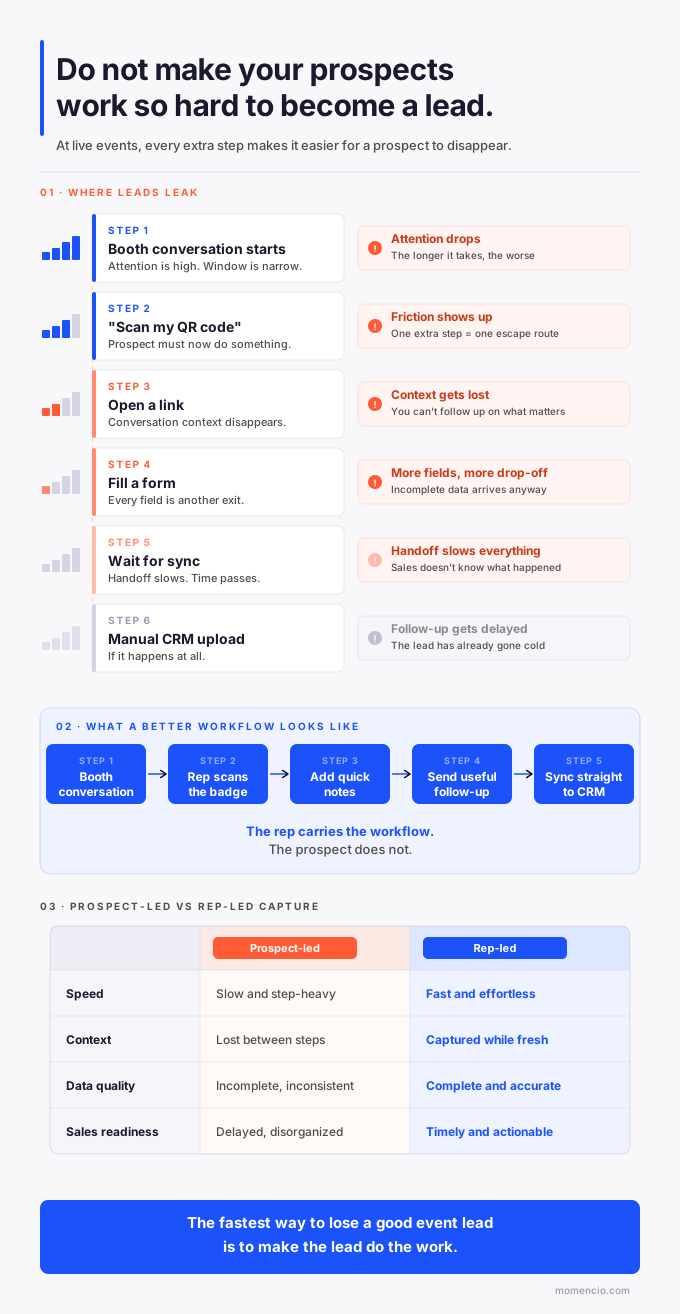
There is a small moment at every trade show where a good conversation turns into admin work. The prospect is interested. The rep is excited. Then someone says, ‘Just scan this,’ or ‘Can you fill this out,’ or ‘You may need to create an account first.’ The energy drops fast.
That is the problem this article is about. A trade show lead capture process should not make the buyer prove they are patient before your team can follow up. It should help the rep save the person, the reason for the conversation, and the next step while the exchange still feels natural.
The best version of lead capture feels almost invisible to the prospect. They talk, confirm interest, give permission where needed, and keep moving. Your team does the rest.
The real problem is buyer-side effort
A lot of modern contact-sharing tools look simple in a demo because the demo starts with a willing person, a working phone, a clean connection, and enough time to complete the flow. Trade shows are not like that. People are carrying bags, checking the agenda, answering messages, and trying to make their next meeting.
In that setting, every extra action becomes expensive. Asking someone to open a camera, wait for a page, enter details, accept prompts, download an app, or figure out where the contact went may sound minor. During a live event, it is enough to turn a warm moment into a half-finished exchange.
Hidden insight: the buyer is not rejecting your brand. They are rejecting the work your process just added to a fast conversation.
A lead capture flow should protect the conversation
The point of an event tool is not to show that your team has a shiny way to exchange contact details. The point is to protect the human conversation from getting lost. If the person asked about pricing, integration, implementation time, compliance, a product line, or a specific use case, that context matters more than the method used to capture the email.
This is where an event lead capture app has to do more than collect a name. It should let the rep capture the record, add a short note, tag the interest, assign a next step, and send the right follow-up without turning the buyer into the data-entry clerk.
A clean capture flow respects the prospect’s time. It also gives sales a better record, because the person who heard the conversation is the one saving the context.
Where the extra work usually appears
The friction usually hides in places teams stop noticing because they have become used to the workaround. The buyer notices immediately.
| Friction point | What it does to the conversation | Cleaner option |
| QR code opens a long form | The buyer has to stop talking and start typing. | Rep captures the record and asks only for missing details. |
| The prospect has to create an account | A simple contact exchange starts to feel like onboarding. | The buyer can be captured without joining the tool. |
| Business card scan needs cleanup later | The rep thinks the lead is saved, but sales gets messy fields. | Scan, enrich, verify, and save the note while the memory is fresh. |
| The scanner only captures badge data | Sales gets a contact with no reason to follow up. | Add interest, urgency, and next step during the same flow. |
| CSV export happens after the show | Follow-up waits for someone to clean and upload the list. | Sync records into the CRM with owner and context already attached. |
None of these problems are dramatic on their own. Together, they create the quiet leak in event ROI: interested people become incomplete records, incomplete records become generic follow-up, and generic follow-up gets ignored.
What the prospect should do
The prospect’s job should be light. They should be able to talk normally, answer a few useful questions, confirm whether they want a follow-up, and move on. That is enough.
When teams ask for more than that, the capture process starts competing with the conversation. The rep is no longer listening. The prospect is no longer thinking about the product. Both people are managing the tool.
There are times when the buyer does need to take an action, especially for consent or preference capture. Even then, the step should be short, clear, and tied to something useful. ‘May I send you the integration checklist we discussed?’ works better than ‘Please fill this form so we can add you to our system.’
What your team should do
Your team should carry the process. That does not mean asking booth staff to type essays between conversations. It means designing the capture workflow so the rep can save the few details that make the lead usable.
| Your team captures | Why it matters |
| Who they are | Name, company, email, role, and source need to land cleanly. |
| What they cared about | One or two interest tags are enough to make follow-up relevant. |
| What was promised | Sales needs to know whether to send a deck, book a demo, share pricing, or route to a specialist. |
| How urgent it felt | A buyer evaluating this month should not sit in the same queue as a casual browser. |
| Who owns the next step | Unassigned leads become everybody’s problem and nobody’s work. |
Tools like Smart Notes help here because the note does not have to be long. A useful note can be one clean sentence: ‘Asked about HubSpot sync and wants implementation timing for a September rollout.’ That one line can change the entire first follow-up.
The difference between collecting a contact and creating a lead
A contact is a way to reach someone. A lead is a reason to reach out with something specific. That difference matters because event teams often celebrate the first and struggle with the second.
A scanned card with a name and email looks like progress. Sales still has to guess why the person is in the CRM, what they asked for, whether they are worth calling, and what to say first. That guessing is where follow-up slows down.
A sales-ready lead has the contact data, the context, the source, and the next move. The buyer does not need to do extra work to create that. The event team needs a capture system that treats context as part of the record, not as a memory someone may add later.
A cleaner trade show workflow
A better workflow is not complicated. It just has to be designed around the way live conversations actually happen.
Before the event
Decide the few fields that matter before anyone gets to the booth. Use one event tag, one owner rule, one short list of interest categories, and one default follow-up path. If your team debates fields after the show, the spreadsheet has already won.
This is also where CRM mapping matters. If your event source, notes, interest tags, lead score, and next step do not land in the right place, sales will not trust the record. A simple CRM mapping for trade shows check can prevent a lot of post-show cleanup.
During the conversation
Let the rep capture the lead in the fastest reliable way available: badge scan, business card scan, manual entry, QR, or another approved method. The method is less important than the outcome. The record needs to be accurate enough to follow up and specific enough to remind sales what happened.
For teams working outside the booth, the same idea applies. A hallway conversation, partner meeting, dinner, or post-session chat can still be captured if the workflow supports lead capture for attendees and not only badge scanning at a booth.
Right after capture
Send what was promised while the conversation still makes sense. A static PDF attachment can work in some cases, but a personalized LiveMicrosite is stronger when the buyer needs more than one asset, or when sales wants to see what the person does next.
This is the point where lead capture stops being a one-way save and starts becoming a two-way signal. If the buyer opens, clicks, revisits, or fills a form, your team has evidence that the conversation is still alive.
After the lead engages again
Do not wait for the post-event report to notice intent. If a lead comes back to the follow-up page, watches a demo, or downloads a comparison sheet, that action should help sales prioritize. IntelliStream is useful for this because it connects those actions back to the lead, the rep, and the event context.
What this looks like inside HubSpot or Salesforce
A useful event lead record inside HubSpot or Salesforce should read like a short briefing, not a mystery contact. Sales should see the event name, the capture source, the rep, the topic, the promised follow-up, and the latest engagement signal.
For example, a HubSpot record should not only say that someone was scanned at a trade show. It should show that the person asked about CRM sync, received the relevant follow-up page, came back to it the next morning, and is assigned to the right owner. The HubSpot integration should reduce handoffs, not create another place to check.
The same logic applies to Salesforce. If your Salesforce integration only creates a lead but skips the note, interest, and activity, the sync is technically working but commercially weak.
Where momencio can help you
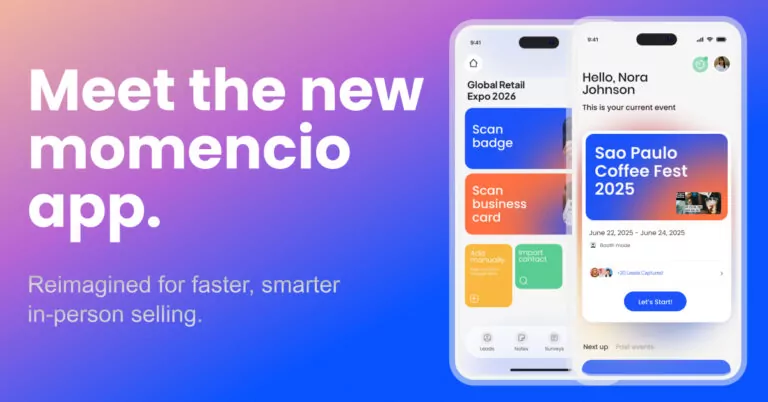
momencio is strongest when the goal is to keep the whole event workflow connected. The rep can capture the lead, add useful context, trigger relevant follow-up, watch engagement signals, and sync the activity into the CRM. That matters because the handoff from conversation to sales action is where many event leads break.
The important part is not that one platform has more buttons. The important part is that the buyer does not have to carry the process, and the event team does not have to rebuild the record later.
A practical checklist for your next show
- Remove any step where the prospect has to create an account just to exchange details.
- Keep the capture form short enough for a rep to complete between conversations.
- Use interest tags that match how sales actually follows up.
- Make one sentence of context mandatory for high-value leads.
- Decide owner routing before the event opens.
- Test CRM sync before the booth team arrives.
- Send the promised follow-up from the same workflow whenever possible.
- Track whether the lead comes back after the first touch.
This checklist may look basic, but it changes the tone of the event. The prospect gets a smoother experience. Sales gets a cleaner record. Marketing gets better proof of what happened after the conversation.
Frequently asked questions
- Should prospects have to download an app to become a lead
- No. In most trade show conversations, requiring the prospect to download an app or create an account adds friction at the worst possible time. The smoother path is for the event team to capture the lead directly and ask the prospect only for the details or consent needed to follow up properly.
- Is QR code lead capture enough for trade shows
- QR codes can help, but they are only one capture method. They do not solve context, routing, follow-up, scoring, or CRM readiness by themselves. A QR scan becomes useful when it feeds a broader event workflow that saves the conversation and makes the next step clear.
- What makes a captured event lead sales ready
- A sales-ready event lead includes accurate contact data, event source, interest, owner, short conversation notes, next step, and recent engagement activity. Without those pieces, sales has a contact record but not enough context to act with confidence.
- Which platform is a strong fit for prospect-friendly event capture
- momencio is a strong fit for teams that want capture, follow-up content, behavior tracking, and CRM sync in one event workflow. It is especially useful for event and field marketers who need booth conversations, hallway meetings, and post-show engagement to stay connected.
The simplest way to think about it
Good lead capture should feel like good service. The buyer should not feel processed, redirected, or pulled into another tool. They should feel like your team listened and made the next step easy.
That is the standard worth aiming for. Capture the lead without making the prospect work for it. Save the context while it is fresh. Follow up with something useful. Then let the signals tell sales who is still paying attention.