Trade shows remain one of the highest-ROI channels in B2B marketing — but only if the leads you collect actually make it into your pipeline. A Harvard Business Review lead-response study found that the average response time to trade show leads is over 42 hours. By then, your best prospects have already had three conversations with your competitors.
The difference between a show that drives revenue and one that produces a spreadsheet nobody acts on is rarely the booth. It is the tool your team uses to capture, qualify, and route leads in real time — and how quickly that data reaches the person who needs to follow up.
In 2026, the trade show lead capture market has matured significantly. Two clear buyer lanes have emerged:
- Universal lead capture platforms — tools your team owns and uses across every event, regardless of which badge system the organiser uses. These push leads directly into your CRM, often with enrichment, qualification, and follow-up automation built in.
- Event-platform lead retrieval add-ons — tools tied to a specific event platform that work well when the organiser already runs that stack, but are not portable across your wider event program.
Understanding which lane you are shopping in is the most important decision you will make before comparing features or pricing. This guide covers the 10 best lead capture tools for trade shows in 2026 — what each does well, who it is best suited for, and what to watch out for.
Editor's note: This article was fully rewritten in April 2026 to reflect the current tool landscape, verified 2026 pricing, and updated buying criteria from real event teams. Tools were evaluated against five buyer-defined criteria: offline reliability, badge compatibility, CRM integration depth, data quality and follow-up context, and total cost of ownership.
Find your tool in 30 seconds
Before reading the full reviews, find your situation in the table below. Each row maps a real buyer scenario to the tool most likely to fit — with a one-line reason why.
| Your situation | Start here | What you still won’t have |
| You need lead capture, event ROI tracking, and pipeline attribution — and your team needs to prove which shows actually made money. | momencio | — |
| Exhibiting 1–2 shows a year and need something that works on the day with no training required. | Wave Connect | Lead activity tracking, behavioural intent, pipeline attribution. |
| Your event organiser runs on Cvent or Whova and you need lead retrieval within that ecosystem. | Cvent LeadCapture or Whova | Enrichment, scoring, personalised follow-up, pipeline attribution. |
| You need conversation context and follow-up drafts generated before your reps leave the venue. | BoothIQ | Lead activity tracking, behavioural intent, pipeline attribution. |
| You attend multiple events and need one consistent tool pushing enriched data into your CRM every time. | Popl | Personalised follow-up, lead activity tracking, behavioural intent, pipeline attribution. |
| You run a high-volume programme with enterprise CRM field mapping and lead routing requirements. | iCapture or Leadature | Personalised follow-up, lead activity tracking, behavioural intent, pipeline attribution. |
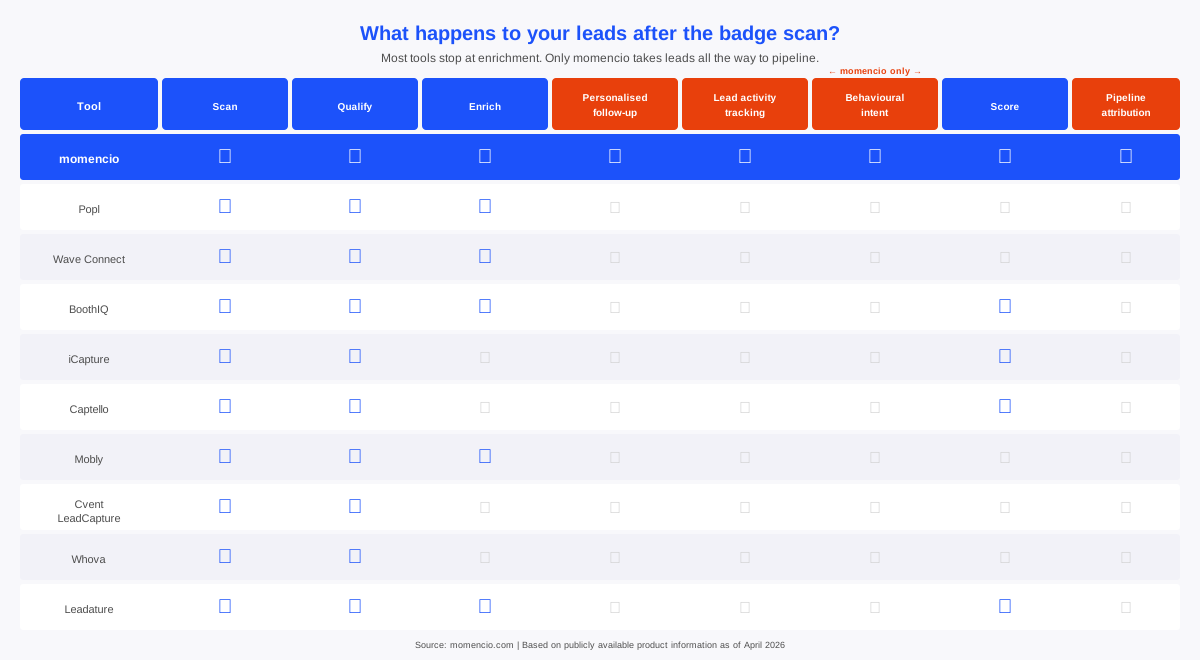
If your situation is in the first row, momencio is the only tool in this list built to answer that question. The sections below explain why everything else falls short of it.
What to look for in a trade show lead capture tool
Before comparing products, align your team on the five buying criteria that consistently surface in real buyer evaluations in 2026.
1. Offline reliability
Convention center Wi-Fi fails constantly. Your tool must capture leads without internet, store them locally, and sync automatically when connectivity returns. Ask vendors exactly what happens offline — what is stored on-device, and what waits for a connection.
2. Badge compatibility
Not all badges are created equal. Some use open QR codes with full contact data embedded. Others use encrypted QR codes that only work with the organizer’s official scanner. Know which scenario you will face and confirm whether your tool can handle it, fall back to OCR of printed badge text, or requires purchasing a badge developer kit from the organiser.
3. CRM and MAP integration depth
“We integrate with Salesforce” means different things to different vendors. What matters is: does it sync in real time or batch export? Can you map custom fields? Does it handle duplicates? Does it tag leads by campaign or event? These details determine whether leads land in your CRM ready to work or require cleanup. See momencio’s full integrations list for a reference point on what deep integration actually looks like.
4. Data quality and follow-up context
A badge scan gives you a name and email. What you need is context — what the prospect said, what they were interested in, how urgent the conversation felt. Tools that capture notes, qualifiers, voice memos, or behavioral signals give your sales team something to act on. For a deeper look at why follow-up context matters, see why your follow-ups are killing your sales pipeline.
5. Setup and adoption time
Some tools are live in minutes from a standard mobile device — no configuration, no training required. Others need field mapping, integration setup, and onboarding before they are useful. Be honest about your team’s capacity for implementation. The most powerful tool is the one your booth staff actually use consistently on the show floor.
The 10 best lead capture tools for trade shows in 2026
1. momencio
Best for: Event teams that need to capture leads and prove pipeline from every show
momencio is an event intelligence platform that gives everyone who attends, hosts, or activates at live events — trade shows, conferences, roadshows, brand activations, and field events — the tools to capture, engage, and convert leads without losing a conversation to a slow follow-up or a missed signal.
momencio’s event app captures leads from any badge, QR code, business card, or name tag, with no rented hardware, no dependency on event-provided APIs, and full offline functionality. Every contact syncs instantly to Salesforce, HubSpot, Marketo, Microsoft Dynamics, Eloqua, and 20+ other CRM and marketing automation platforms — plus 1,000+ tools across the broader sales and marketing stack — the moment it is captured. No manual uploads, no post-show cleanup.
What sets momencio apart is what happens during the conversation, as well as immediately after it. A rep can present product videos and PDFs, run lead qualification surveys, and dictate conversation notes from a standard mobile device. The moment a conversation ends, the rep selects the content the prospect engaged with, generates a personalized LiveMicrosite™ around it, and sends a follow-up email with the link before the prospect has even moved to the next booth. The follow-up is warm, relevant, and already in their inbox while the conversation is still fresh.
From that point, IntelliStream™ logs every touchpoint into a unified engagement timeline per contact — email opens, microsite page visits, document downloads, return visits, scroll depth, and session behavior, all tied to a known identity with full conversation context. Teams see exactly who stayed engaged, what held their attention, and when interest started to build or fade. Lead alerts surface the right moment to follow up, so no signal goes unnoticed.
For teams that need to go deeper, AI IntelliSense™ layers behavioral scoring on top of that engagement data, analyzing intent signals, ICP fit, urgency, and conversion proximity to rank contacts and surface suggested next actions. AI EdgeCapture™ enriches contact records with verified business emails, LinkedIn profiles, and firmographic data. And event performance dashboards give marketing and sales leadership visibility into lead quality, team activity, content engagement, and event ROI across every event in the calendar — making it straightforward to identify which events drive real results and plan accordingly.
| CRM integrations | Salesforce, HubSpot, Microsoft Dynamics, Marketo, Pardot, Eloqua, Pipedrive, Zoho, Freshsales, and 20+ other CRM and marketing automation platforms. Plus 1,000+ integrations across Slack, Microsoft Teams, WhatsApp, SendGrid, Apollo, Salesloft, and more. |
| Offline capability | Full lead capture, qualification, content presentation, note-taking, and survey functionality works without an internet connection. Data syncs automatically once reconnected. |
| Who it’s built for | Teams that attend, host, or activate at live events — trade shows, conferences, roadshows, brand activations, and field events — who need to capture, engage, and convert leads without losing a conversation to a slow follow-up or a missed signal. |
| Worth knowing | momencio works on standard iOS and Android devices with no proprietary hardware required. SOC 2 Type 2 certified with built-in data privacy protections throughout the lead capture and management process. |
2. Popl
Best for: GTM teams that need a consistent, CRM-first workflow across all events
Popl’s architecture is built around the idea that your team should not be relearning a new tool at every show. It functions as a universal platform — your reps capture leads the same way at every event, regardless of which badge system the organiser uses. When a QR code is encrypted and will not scan with third-party apps, Popl falls back to reading the printed text on the badge and running enrichment to complete the contact record.
Enrichment uses multiple providers in sequence, meaning if one data source cannot complete a record, the next one tries. Leads captured offline are stored on-device and sync once connectivity returns. Popl also covers the in-person networking layer that badge scanners miss — digital business cards, NFC-based contact exchange, and QR-based sharing.
| CRM integrations | Salesforce, HubSpot, Microsoft Dynamics, Zoho, Pardot, Marketo, Pipedrive, Monday, Slack, Zapier, and others. Some integrations require the Event Lead Capture plan. |
| Offline capability | Confirmed. Leads stored on-device, sync and enrich once connectivity returns. |
| Who it’s built for | Growth and enterprise GTM teams where events are a consistent pipeline channel and CRM integration, enrichment, and cross-event consistency are the primary requirements. |
| Worth knowing | Pricing is not publicly listed — flagged repeatedly in G2 reviews as a friction point. Build in time for a sales conversation before evaluating. |
3. Wave Connect
Best for: SMB and mid-market teams that want practical coverage at a published price
Wave Connect is the most straightforward value proposition in this list: badge and business card scanning, offline capture, real-time CRM sync, lead qualification, and a digital business card — at a published price starting free. For teams paying $300–$500 per scanner rental per show, the economics of switching are immediate.
The tool works from your phone. Offline mode captures and stores leads locally, syncing automatically when Wi-Fi returns. Qualification tools, notes, tags, scoring, give reps a way to add context beyond the contact fields. Wave’s digital business card feature means reps can also share their own contact details via QR or NFC.
| CRM integrations | Salesforce, HubSpot, Zoho CRM, and Pipedrive natively. Zapier or CSV export for other CRMs. |
| Offline capability | Explicitly confirmed. Captures offline, syncs automatically when reconnected. |
| Who it’s built for | Individuals and small to mid-market teams that want a fast, affordable tool for badge scanning and CRM sync without complex setup or enterprise deployment requirements. |
| Worth knowing | G2 reviewers note some QR code and NFC reliability issues in specific event configurations, and occasional friction in team onboarding. Native CRM list is narrower than enterprise tools — teams on Marketo or Eloqua will route through Zapier. |
4. BoothIQ
Best for: Teams that want AI-assisted conversation capture and follow-up drafting
BoothIQ’s differentiator is context, not just contact data. Most lead capture tools give you a name and email. BoothIQ gives you a voice memo transcript, a conversation summary, a follow-up email draft, and action items — generated from what your rep said at the booth, not from a form.
Its badge scanning approach is also unusually flexible: it reads badge text using AI rather than decoding QR codes or barcodes, which means it works on any badge format at any show, including events where QR codes are encrypted or not present. The ability to pause and restart the subscription means teams only pay during the months they are actually running shows.
| CRM integrations | HubSpot, Salesforce, and Zoho natively. CSV export for others. |
| Offline capability | Confirmed 100% offline. Syncs when back online. |
| Who it’s built for | Teams that attend multiple events and want AI-assisted context capture and follow-up assistance, and who prefer a flexible monthly model they can pause between shows. |
| Worth knowing | BoothIQ has limited third-party review volume compared to more established tools — worth noting if your procurement process relies on G2 scores. Enrichment can miss contacts at small or niche-industry companies. |
5. iCapture
Best for: Enterprise teams running consistent, high-volume event programmes with deep CRM requirements
iCapture is the incumbent choice for teams that have outgrown simple scan-and-export tools and need lead capture that fits precisely into an existing CRM and marketing automation workflow. Setup is more involved than lighter tools, field mapping, qualifier configuration, and integration setup require upfront time, but the result is a consistent system that standardizes data quality across every show your team attends.
The platform covers QR and barcode badge scanning, business card capture, custom qualifier forms, lead scoring, segmentation, and analytics. Integrations with Salesforce, HubSpot, Marketo, and Eloqua are built and maintained in-house rather than routed through third-party connectors.
| CRM integrations | Salesforce, HubSpot, Marketo, Eloqua, and others. Integrations built in-house via encrypted connections. |
| Offline capability | Confirmed. Leads captured offline are stored on-device and synced when connectivity returns. |
| Who it’s built for | Mid-market and enterprise teams that have outgrown basic scan-and-export tools and need lead capture that fits precisely into an existing CRM and marketing automation workflow at scale. |
| Worth knowing | Entry-level investment is significant — best suited to teams running a high volume of events annually where the standardization pays back. G2 reviewers flag initial setup time as a consideration, particularly around field mapping. |
6. Captello
Best for: Teams focused on booth engagement mechanics alongside lead capture
Captello sits at the intersection of lead capture and booth experience. Beyond scanning and qualifying leads, it provides engagement mechanics — games, activations, digital experiences — that give booth staff a reason to start a conversation and a structure to qualify the lead within it.
The platform handles QR and barcode badge scanning, custom qualification forms, lead scoring, and CRM sync. Its distinctive value is the activation layer: branded games and interactive experiences that drive booth traffic, increase dwell time, and create a capture moment that feels less transactional than a badge scan.
| CRM integrations | Real-time CRM sync supported. Confirm specific named CRMs and field mapping depth at demo. |
| Offline capability | Verify with Captello for your specific event configuration. |
| Who it’s built for | Teams where driving booth traffic and creating memorable attendee interactions are as important as capturing contact data — events where the experience at the booth is part of the strategy. |
| Worth knowing | Captello is most valuable when booth engagement and traffic generation are explicit goals alongside lead capture. Teams running a straight scan-and-qualify workflow may not need the engagement layer. |
7. Mobly
Best for: Teams that prioritize CRM data quality
Mobly’s core premise is that the problem with most lead capture tools is not the capture, it is the data quality that lands in the CRM. It focuses on OCR-based capture from badges, business cards, and handwritten notes, enrichment via a waterfall of data providers, email validation before sync, and direct CRM and MAP integration.
Voice memo and structured context-capture features give reps a way to add qualification signals and conversation notes, which flow into the CRM alongside the contact record. Mobly claims a greater than 90% valid email yield from enrichment, a meaningful claim for teams where CRM hygiene is a primary concern.
| CRM integrations | Salesforce, HubSpot, Marketo, Pardot, Zoho, Pipedrive, Eloqua, and any platform supporting webhooks. |
| Offline capability | Confirmed. Captures save locally and upload once back online. |
| Who it’s built for | Teams running events that just need a way to capture leads without things falling apart, and try to avoid pushing messy data into the CRM. |
| Worth knowing | Limited independent review volume in the public domain makes third-party validation harder to access. Worth a demo conversation for teams where CRM data quality and enrichment depth are primary buying criteria. |
8. Cvent LeadCapture
Best for: Exhibitors at events where the organiser runs on Cvent
Cvent LeadCapture is the clearest example of an event-platform-tied tool in this list. If the organiser of your event uses Cvent, this is often the path of least resistance — it works natively with the event’s badge system, integrates into the exhibitor portal, and gives organizers centralized reporting across all exhibiting companies.
Exhibitors can scan badges and business cards, qualify leads with notes and ratings, and export data for CRM import. Pricing is per-event and set by the organiser, costs vary by show and exhibitor tier.
| CRM integrations | CRM import confirmed. Specific named integrations and field mapping depth depend on your Cvent configuration. |
| Offline capability | Not specified in standard product materials. Verify with the organiser for your specific event. |
| Who it’s built for | Exhibitors at events where the organiser already runs on Cvent and wants to provide a packaged lead retrieval experience with centralized reporting across all exhibiting companies. |
| Worth knowing | Cvent LeadCapture is not a tool you own and deploy independently across events. Best treated as a show-specific option rather than a permanent platform investment. |
9. Whova
Best for: Organizers who want to provide exhibitors with lead retrieval inside the event app
Whova operates from the organiser side of the equation. For exhibitors at a Whova-powered event, lead retrieval is embedded directly in the app they are already using — scanning attendee QR codes, qualifying leads with notes and ratings, running promotions such as passport contests and giveaways, and exporting data.
The promotional mechanics are worth noting: exhibitors can run contests and incentive campaigns directly through Whova that drive booth traffic, which makes it more than a passive capture tool at events where the organiser has activated these features.
| CRM integrations | Spreadsheet export confirmed. Named CRM integrations listed as a capability but not enumerated in standard documentation — confirm with your event organiser. |
| Offline capability | Third-party reviews flag limited offline functionality for advanced features. Verify for your specific event configuration. |
| Who it’s built for | Event organizers who want to provide exhibitors with a self-serve lead retrieval experience inside the event app, with promotional mechanics to drive booth traffic. |
| Worth knowing | Whova’s value depends heavily on what the organiser has activated. Check with your event organiser before assuming capability. This is not a tool you bring to events independently. |
10. Leadature
Best for: Large exhibitors and agencies managing high-traffic booths at major trade shows
Leadature is used by Fortune 500 exhibitors and event marketing agencies running high-volume booths where speed, accuracy, and CRM-ready data are non-negotiable. If your booth scans hundreds of badges a day across multiple reps, Leadature is built for that pace.
The platform supports all major badge types, covers QR and barcode scanning, business card capture, and custom qualification forms. Its AI layer turns each scan into an enriched, scored profile — verified job title, company insights, work email, intent signals, automatic tags, and follow-up recommendations, before pushing to the CRM.
| CRM integrations | Salesforce, HubSpot, Marketo, and others. Custom exports and reporting included. |
| Offline capability | Confirmed. Offline capture with automatic sync when connectivity returns. |
| Who it’s built for | Large exhibitors, Fortune 500 event teams, and agencies managing high-traffic booths at major trade shows where speed, data accuracy, and CRM-ready records at scale are non-negotiable. |
| Worth knowing | Positioned for high-volume and enterprise event programs. Limited public review volume — worth validating through a demo and reference check before committing. |
How to choose the right tool for your team
Run through these four questions before shortlisting:
How many events do you run per year?
If it is one or two, a per-event or low-cost subscription tool is likely sufficient. If it is six or more, the economics of a universal owned platform justify more investment — and the consistency of having one tool your team knows across all shows is itself a significant operational advantage.
What does your CRM workflow actually require?
If your team needs leads to arrive with specific custom fields populated, routed to the right rep, tagged by campaign, and duplicate-checked on entry — that narrows your list to tools with deep integration documentation. If you need name, email, and company into a standard object, most tools on this list cover that. See momencio’s integrations as a benchmark for what enterprise-grade integration depth looks like.
What happens when the Wi-Fi goes down?
Every tool on this list claims some form of offline capability. Ask each vendor specifically: what is captured and stored locally, what waits for connectivity, and how is data reconciled if a rep changes data offline before sync? The answers vary significantly.
What do you actually do with leads after the show?
If your follow-up process is a CSV handed to sales, a simpler tool at lower cost is fine. If you want automated personalized follow-ups, behavioral scoring, and content engagement tracking feeding back into your pipeline — that is a momencio conversation. For a practical framework on building a follow-up system that converts, see 10 post-event follow-up email strategies that actually work.
Frequently asked questions
- Will the tool work if the event’s QR code is encrypted?
- Some events use encrypted QR codes that only decode with the organizers’ official scanner. Tools that handle this include Popl (developer badge kit integration plus OCR fallback) and BoothIQ (reads printed badge text rather than decoding QR). Tools like Wave Connect and Cvent LeadCapture rely on open QR and barcode formats — verify with your specific event organiser before the show.
- Do I need to buy a badge developer kit?
- Some events offer a badge API or developer kit that allows third-party apps to access the same attendee data as the official scanner. These kits are typically purchased from the organiser. A real 2026 example showed a badge kit priced at $995. Not all events offer them — check with the organiser ahead of time.
- Are CRM integrations included as standard or are they add-ons?
- It varies by tool. Some include native CRM integrations in their standard offering. Others treat them as add-ons or limit the integration depth by plan tier. Always ask vendors to confirm which CRMs are supported natively, whether field mapping and campaign tagging are included, and whether there are additional costs for the integrations your team actually uses.
- How quickly should leads sync to the CRM?
- Best practice is same-day, ideally before you leave the venue for hot prospects. Tools with real-time sync support this. Tools that batch-export or require manual upload introduce delay that consistently reduces follow-up conversion rates.
- Can these tools capture leads from people who do not have badges?
- Yes, for most tools on this list. Business card scanning via OCR is supported by momencio, Popl, Wave Connect, BoothIQ, iCapture, and Mobly. Manual entry and QR-based digital card exchange cover scenarios where no badge or card is present.
- How do I know which tool is right for my team’s maturity level?
- Start with what happens after the badge scan. If your team’s current process is exporting a CSV and handing it to sales, start with a lighter tool that solves the capture problem first. If your team already has a CRM workflow, qualification process, and follow-up sequence in place, look for a tool that integrates into and enhances that workflow rather than replacing it. The tools in this list that offer the deepest intelligence — engagement tracking, behavioral scoring, pipeline attribution — deliver the most value to teams that already have the basics working.
- How do I measure ROI from trade show lead capture?
- Start with pipeline attribution: which captured leads converted to opportunities, and at what value? Tools like momencio include event analytics and dashboard reporting. For tools without built-in ROI reporting, ensure your CRM is configured to capture event source as a campaign attribute on each lead — without that tagging, revenue attribution is guesswork.
The bottom line
The right lead capture tool is the one that matches your event program’s actual complexity — not the most feature-rich option or the cheapest one, but the one your booth staff will use consistently and that puts clean, contextual data into the hands of the people following up.
For B2B event teams running a dedicated event program where pipeline attribution and post-show follow-up quality matter, momencio provides the deepest intelligence layer in this category — from capture through to personalized follow-up and revenue tracking. No other tool in this list covers all eight stages of the post-scan journey.
For teams earlier in that journey, Wave Connect, BoothIQ, or Popl offer strong starting points with fast onboarding and flexible models that grow with your program.
Whatever tool you choose, the single most important variable is not the software — it is the follow-up speed. The teams that consistently convert trade show leads into pipeline are the ones that act on the day, not the week after. For more on building a system that does that, see why your follow-ups are killing your sales pipeline.