
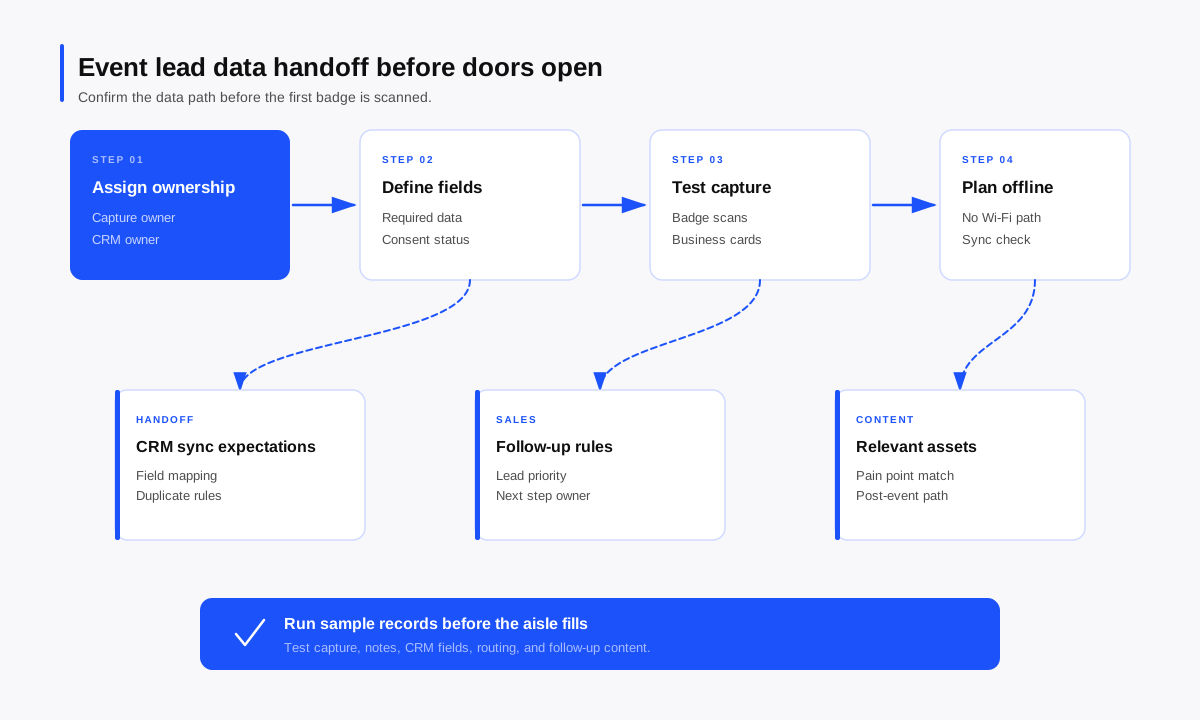
Most event lead problems do not start after the show. They start in the quiet hour before doors open, when the booth looks ready but the data path has never been tested.
The scanner works. The banners are straight. The team has coffee. Then the first rush hits, badge scans pile up, business cards land in pockets, and sales asks why half the leads have no context.
That mess usually has a simple cause: nobody confirmed the handoff rules before capture began.
TL;DR
An event lead data handoff checklist confirms how lead information will move from booth capture to CRM, sales follow-up, and post-event reporting before the first badge is scanned. It should cover lead ownership, required fields, badge scan setup, business card capture, offline capture, consent language, CRM sync timing, duplicate handling, sales routing, follow-up timing, and content handoff. The checklist also needs a short data quality test before the show opens: capture sample leads, check field mapping, confirm notes appear where sales expects them, and verify that follow-up content can be tied to the right conversation. The point is simple. A trade show lead is useful only when the contact record carries enough context for the next person to act. If the team agrees on capture rules before the floor gets busy, sales receives fewer mystery names and more usable follow-up paths.
Why event lead handoff breaks before the show starts
The booth team often treats lead handoff as a post-show problem. Once the event begins, reps work from memory, traffic surges, Wi-Fi drops, and every small decision gets made under pressure.
The handoff breaks when marketing, sales, and revenue operations assume different processes. Marketing cares about campaign attribution. Sales needs pain point, urgency, role, and next step. RevOps needs required CRM values, duplicate rules, and source tracking. The checklist gives all three teams one operating model before the floor opens.
Industry guidance from CEIR, shared through an exhibitor lead quality report, makes the same practical point: lead quality improves when exhibitors capture more than badge data and secure a clear next action. That means the data handoff needs to support the conversation, not just the contact record.
Pre-show handoff checklist
Use this checklist in the booth walk-through, ideally the day before the show or at least before the first staff shift.
| Handoff area | What to confirm | Owner |
| Lead definition | What counts as a lead, a non-lead, and a sales-ready lead | Marketing and sales |
| Lead ownership | Who owns booth capture, CRM hygiene, sales routing, and follow-up reporting | Event lead and RevOps |
| Required fields | Which fields must be completed before a record can sync or route | RevOps |
| Badge scans | What the badge scan provides and which missing fields reps must add | Event lead |
| Business cards | How cards get captured, checked, enriched, and synced | Booth staff lead |
| Offline capture | What happens when Wi-Fi fails or the venue network drops | Event lead and vendor owner |
| Notes | Which conversation details reps must capture in plain language | Sales lead |
| Consent | What permission language applies to email, SMS, or future outreach | Legal, marketing ops, and event lead |
| CRM sync | Which system receives the record, how often sync runs, and how errors get handled | RevOps |
| Sales handoff | How hot, warm, and nurture leads move to the right owner | Sales lead |
| Follow-up timing | When the first follow-up goes out and who sends it | Sales and marketing |
| Content handoff | Which content should match each common pain point or buying stage | Product marketing and sales |
Confirm lead ownership
Assign a named person for capture operations, CRM troubleshooting, sales routing, and post-event reporting. If a lead sync fails, who checks the queue? If notes are missing, who decides whether the problem is training, mapping, or workflow? The best pre-show meeting answers these questions in ordinary language.
Lock the required fields
Required fields should match how sales follows up. At minimum, confirm the fields for name, company, email, role, lead source, event name, booth staff owner, interest area, urgency, next step, and consent status where applicable.
Separate required fields from nice-to-have fields. A crowded booth cannot support a twenty-question form.
Check badge scan requirements
Badge data varies by event. Some scans return clean contact information. Some provide limited fields or require organizer approval.
Before the show opens, run test scans and compare the results against your required fields. If the scan gives only name, company, and email, decide which missing context the rep must capture manually.
For teams using momencio, QR and badge scanning is an official capture method, so the pre-show test should confirm what the scan collects and what staff still need to add.
Define business card capture
Business cards still appear at trade shows, especially when visitors do not have the right badge or stop by outside the official expo flow.
Confirm who scans cards, when they scan them, and how they handle missing email addresses or handwritten notes. If your process uses momencio, business card scanning is a verified capability, and AI EdgeCapture™ can enrich captured business card data with company information and social profiles according to momencio source material.
No card should become a record without conversation context. A card with no pain point, next step, or owner becomes another name for sales to decode later.
Prepare for offline capture
Venue connectivity fails often enough that offline capture should be part of the plan. Confirm whether booth staff can scan, enter notes, and save records without live internet access. Also confirm what happens when the connection returns.
If your team needs to plan for unreliable Wi-Fi, momencio has an article on the offline lead capture app use case, and its field marketer page states that momencio helps capture, qualify, enrich, and act on leads even when Wi-Fi fails.
Do a real offline test. Turn off Wi-Fi, capture a sample lead, add a note, reconnect, and check the record.
How to confirm lead data quality before doors open
Data quality needs a short rehearsal with real devices and real field values.
Run a sample record test
Create sample leads that reflect what will happen on the floor:
- One clean badge scan with complete data.
- One badge scan with missing job title.
- One business card.
- One high-priority account with detailed notes.
For each record, check the capture app, CRM, campaign association, required fields, owner assignment, consent field, and notes location.
Check CRM mapping before the first scan
CRM mapping is where booth context often disappears. A rep may capture the right note, but the note lands in a hidden field. An event campaign may exist, but the campaign member status stays blank.
Use the pre-show test to confirm that booth data lands where sales works. momencio has a deeper guide to CRM mapping for trade shows that explains how notes, score, intent, asset engagement, and timing can support sales action after sync.
Decide how duplicates get handled
Duplicates create confusion during follow-up. Before the show opens, confirm the primary matching rule. Many teams use email first, then company plus name as a backup. Also decide who reviews duplicate conflicts during or after the event.
Review consent and compliance
Consent rules depend on audience, geography, communication channels, and company policy. The pre-show checklist should confirm the permission language, where consent gets recorded, and what happens when a visitor declines.
Keep the rule simple enough for staff to follow while standing, talking, and scanning.
What sales needs before follow-up begins
Sales needs enough context to choose the right next action.
At minimum, each qualified lead should answer five questions:
- What problem brought this person into the conversation?
- What product, use case, or topic did they care about?
- How urgent is the need?
- What did the rep promise to send or do next?
- Who owns the next touch?
Those answers turn a lead record into a usable handoff. They also protect the buyer from explaining the same issue twice.
Where momencio fits naturally
momencio fits the handoff problem when the team wants one event lead capture process that carries context beyond the scan.
Official momencio pages verify lead capture through badge scans, QR codes, business cards, manual entry, and Universal Lead Capture. AI EdgeCapture™ supports capture and enrichment from event badges, business cards, and name tags. momencio also documents CRM sync for Salesforce, HubSpot, and Dynamics 365, plus smart notes, email follow-up, content assets, dashboards, LiveMicrosites™, and IntelliStream engagement visibility.
For a pre-show checklist, that matters because the team can test the whole path: capture the contact, add the conversation note, sync the record, send or prepare relevant content, and see how post-event engagement supports follow-up.
Final pre-show check
Before the first visitor arrives, ask the booth captain to confirm ownership, required fields, badge scanning, business card capture, offline backup, note standards, CRM sync, sales routing, follow-up timing, content handoff, and error handling. If the team cannot confirm one of these, fix it before the aisle fills.
Frequently asked questions
What is an event lead data handoff?
An event lead data handoff is the process of moving lead information from booth capture into the systems and people responsible for follow-up. It includes contact data, conversation notes, qualification details, consent status, CRM fields, sales ownership, and promised next steps.
What fields should be required for trade show leads?
Required fields should include the basics, such as name, company, email, event name, and lead source, plus the fields sales needs for action: interest area, pain point, urgency, next step, owner, and consent status where needed.
How do you prevent trade show leads from getting stuck after the event?
Confirm the CRM sync, owner assignment, campaign mapping, follow-up timing, and exception process before the show opens. Then run test records through the full path so the team can fix broken fields or routing rules before real leads arrive.
Should badge scans count as qualified leads?
A badge scan alone should count as a captured contact, not automatically as a qualified lead. A qualified lead should include enough information to justify follow-up, such as need, role, interest, urgency, or an agreed next action.
When should sales follow up after a trade show conversation?
Sales should follow up while the conversation is still fresh. The pre-show checklist should define timing by lead priority before the event begins.
If your team is preparing for a show, momencio helps you capture leads, preserve booth context, sync event data into your sales process, and use post-event engagement to guide clearer follow-up.