Every few months, a new AI tool gets added to the approved software list. Someone runs a lunch-and-learn. The deck goes around. And then, very quietly, nothing changes. The rep at the booth still types the same notes into the same spreadsheet. The follow-up still goes out three days late. The lead list still arrives from the event organizer looking like a CSV that belongs in a different era. If your event team is not using AI, the problem is almost certainly not the tool. It is the way the tool was introduced.
There is a specific moment when AI adoption fails, and it happens before anyone logs in for the first time. It happens when a manager says, “We are going to start using AI to improve our event workflow.” That sentence, as well-intentioned as it is, does two things simultaneously. It signals that there is a new process to learn, and it promises an upside that is abstract enough to feel unproven. For a rep who is already managing booth logistics, lead qualification, floor conversations, and follow-up coordination, the response is almost always the same: more work, no guaranteed payoff.
The adoption wall
Event teams operate in one of the most cognitively demanding environments in the B2B sales calendar. Trade shows and conferences are high-noise, high-pressure environments where reps are moving at the pace the floor demands. There is no spare capacity for picking up something unfamiliar mid-event. Asking your team to incorporate a new tool into that environment is not a reasonable request in isolation. Without the right framing, it is a setup for quiet resistance.
When you present AI as a system to adopt, you are asking the team to carry a new mental model into that environment. Where do I open this? What do I do with this output? How does this connect to what I was already doing? These questions do not get answered once and disappear. They surface every time the tool appears in the workflow, until the tool stops appearing entirely.
This is not a technology problem. It is a framing problem. The event teams that actually succeed with AI at shows never ran an AI adoption initiative. They removed a friction point, replaced it with something that worked better, and moved on. The team never had to think about the technology because the technology never interrupted them.
The reframe that changes everything
The shift is not from an old process to a new process. It is from process plus burden to process minus friction. That distinction matters because it changes what you ask the team to pay attention to. Stop talking about the tool. Start talking about the outcome.
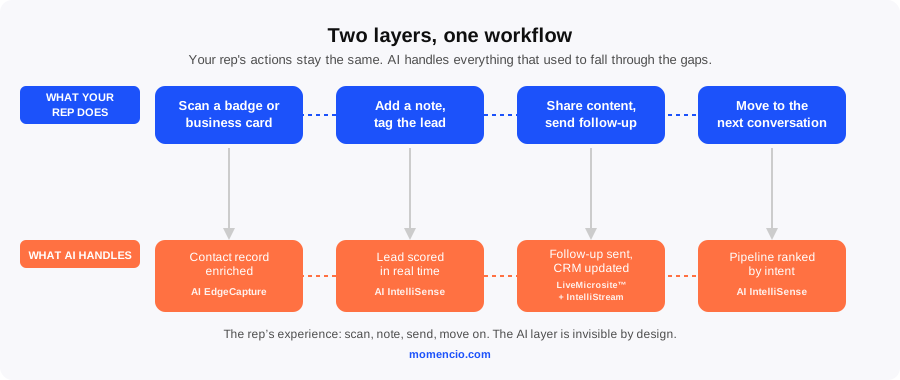
Here is what that looks like in practice. A rep scans a badge. In the traditional workflow, they get a name and a company name, and if the scan is blurry or the record is incomplete, they log what they can and plan to fix it later, if they remember. In a workflow where AI is doing its job in the background, the same scan produces an enriched contact record with a verified business email, job title, company firmographics, and LinkedIn profile. The rep did not change what they did. They scanned a badge. The AI handled the enrichment automatically. That is precisely what AI EdgeCapture is built for. It fills in what badge scans miss, corrects errors from business card reads, and enriches manual entries without any additional action from the rep.
The workflow requires no training session, no new steps, and no explanation. Just a better output from exactly the same action.
Where the real friction is hiding
If you want to know where AI can make the biggest difference in your event program, look for the moments where your team is compensating manually for what a system should be delivering automatically. In most event programs, those moments cluster around four bottlenecks.
- Capture quality on the floor. Badge scans miss fields. Business card reads produce errors. Manual entries are inconsistent across reps. Every event manager who has cleaned up a post-show lead list knows how many hours disappear into fixing what should have arrived correctly in the first place.
- Follow-up speed after the show. Research on follow-up timing consistently shows that contacts who receive personalized outreach within 24 hours of an event interaction convert at significantly higher rates than those who wait longer. Most event teams do not hit that window. Reps are traveling. The debrief is still running. The follow-up email has not been written yet.
- Lead prioritization. When 200 contacts come back from an event, who does the sales team call first? Without a scoring system, the decision defaults to gut feel or alphabetical order. Neither is a pipeline strategy.
- Reporting back to leadership. Event managers spend hours after every show assembling performance data from spreadsheets, email threads, and memory. By the time that information reaches leadership, the window to act on it has largely closed.
Each of these is a place where your team is doing manually what a system should handle automatically. And each of them is exactly where AI earns its place in an event workflow without adding a single burden to the people on the floor.
What a frictionless AI workflow actually looks like
The clearest way to understand this is not to describe the technology but to walk through a show day from the rep’s point of view.
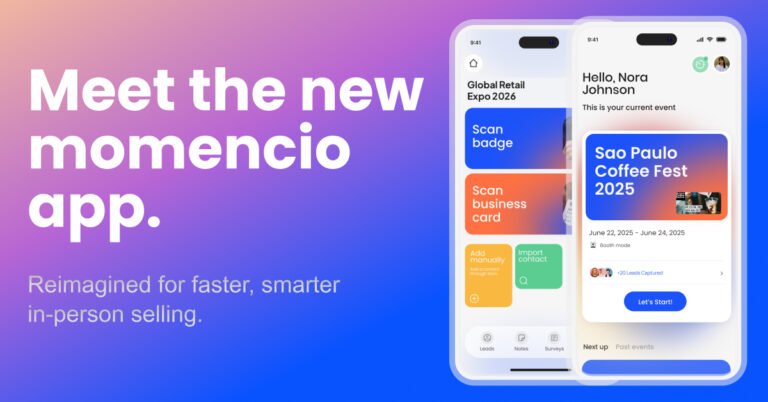
Before the floor opens, the rep launches the momencio event app on their device. Everything they need is already there: their lead capture tools, their qualification criteria for the day, and the full Digital Assets Library loaded with the presentations, product videos, and brochures they will share during booth conversations. There is no hunting through shared drives or forwarding files to themselves the night before. The content is available offline, organized, and ready.
At the booth, the rep scans a badge or photographs a business card. A complete, enriched contact record appears. They add a short note about the conversation, tag the lead’s interest level, and move on to the next person. The whole interaction takes seconds. The rep has not thought about AI at any point.
For contacts who showed clear intent during the conversation, a personalized follow-up goes out before they have even left the show floor. The rep selects the relevant content from their library, and the prospect receives a LiveMicrosite tailored to the specific topics discussed at the booth. From that point, IntelliStream tracks every email open, asset view, and microsite return visit, feeding that engagement data directly into the CRM without anyone copying or pasting anything.
Behind the scenes, AI IntelliSense is evaluating every captured lead across six dimensions: engagement depth, intent signals, ICP fit, urgency indicators, strategic role, and behavioral similarity to past converters. By the time the team leaves the venue, the lead list is not a flat export sorted by scan time. It is a ranked pipeline with the highest-intent contacts at the top. The sales team does not have to decide who to call first. That work has already been done.
For the manager tracking performance from the floor or the home office, the event dashboard provides live data across the full team: lead volume per rep, content engagement, follow-up rates, and lead quality distribution. There is no report to compile after the show. The full picture is visible while the event is still happening.
The rep’s experience of all of this is: scan, note, send, move on to the next conversation. They did not adopt AI. They just had a better day at the show.
Three things that determine whether AI actually sticks
If you are an event leader trying to build AI into your team’s event program, the technology is rarely the limiting factor. What you say and do before the team first touches the tool is almost always what determines whether it gets used consistently or quietly abandoned.
- Introduce it through a problem your team already complains about. If reps have been frustrated by incomplete scan data for two shows running, show them what an enriched contact record looks like before you explain how it was produced. The reaction is immediate. There is no adoption barrier because the pain point is already understood and shared.
- Show the output before explaining the input. Let your team see a ranked lead list, a live dashboard, or a personalized follow-up microsite that went out while the conversation was still warm. When the output is visible and clearly useful, the question shifts from “do I have to use this?” to “how do I get more of this?”
- Never require extra work to make the AI function. The moment the technology asks for a new logging step, a separate form to complete, or a new platform to open alongside everything else, it will be deprioritized and eventually dropped. AI that lives inside the existing workflow gets used. AI that sits on top of it does not.
If you are evaluating how to bring AI into your event team’s workflow without adding to what your reps already carry, the right place to start is with the workflow itself. Map the four friction points above. Identify where your team is compensating manually for what a system should be delivering automatically. Then look for tools that fit into exactly those gaps rather than creating new ones.
momencio’s event intelligence platform is built around that principle. The AI works in the background, the reps work the floor, and the data moves forward without anyone stopping to manage it. To see what that looks like across a full event cycle, request a demo and the team will walk you through it.
Frequently asked questions
What AI tools actually help event teams without requiring training?
The tools that work without training are the ones that do not require your team to change what they are already doing. Enrichment that runs automatically at the point of scan, contact records that arrive complete rather than needing cleanup, and follow-up that can trigger from the show floor rather than waiting for the post-event debrief. None of these require a separate onboarding session because the rep’s action never changes. The momencio event app is designed on this principle, embedding AI into the existing capture and follow-up workflow rather than building a parallel process around it.
How do I get my sales reps to actually use AI at trade shows?
Do not frame it as AI. Frame it as a better version of something they are already doing. “When you scan a badge, you now get a complete contact record” is a more effective message than “we are integrating an AI enrichment layer into the capture process.” When reps see AI EdgeCapture filling in the fields they used to spend time correcting after the show, and when they see the follow-up they would have sent on Thursday going out on the show floor on Tuesday afternoon, the resistance disappears. Show the output first and the adoption conversation takes care of itself.
Can AI help with lead quality, not just lead volume?
Yes, and this is where the highest-value work sits. Enrichment addresses the data quality problem, ensuring every contact record arrives with verified information rather than whatever the badge scan could read. Behavioral scoring addresses the prioritization problem, separating contacts who showed genuine buying signals from those who collected a branded item and kept walking. AI IntelliSense evaluates every captured lead across six dimensions in real time, producing a prioritized pipeline rather than a flat contact list. More leads are relatively easy to generate. Better leads, ranked correctly by intent, are what actually drive pipeline.
What happens to event leads if the team doesn’t follow up fast enough?
They go cold, and the research on this is consistent: leads that do not receive follow-up within 24 to 48 hours of the initial interaction are significantly harder to re-engage. The practical answer is to begin follow-up during the event, not after it. LiveMicrosites can be sent while the conversation is still fresh, connecting each lead to a personalized experience built around the specific content discussed at the booth. From that point, IntelliStream tracks engagement across email opens, asset views, and microsite return visits, so the sales team knows which leads are actively warm without waiting on a post-event debrief.
How do event managers get real-time visibility into what their team is doing at a live show?
Traditionally, event managers wait for a post-show debrief assembled from memory and spreadsheets days after the event closes. That model produces insights too late to be actionable. A live dashboard that shows team performance as it happens is a fundamentally different operating model: lead volume per rep, content that is generating engagement, follow-up completion rates, and lead quality distribution visible in real time. momencio’s event dashboard provides that view without requiring the field team to file a separate report or step away from the booth to update anything.
Is AI at events only useful for large enterprise teams?
No. The problems AI addresses at events are not a function of team size. Bad scan data, slow follow-up, no lead prioritization, and no real-time performance visibility affect exhibitors of every size who attend events regularly. Smaller teams often feel the impact more acutely because they have less capacity to compensate manually. A three-person team at a regional trade show benefits from automatic lead enrichment just as meaningfully as an enterprise team at a global conference. The value scales with the volume of manual work being replaced, not with the size of the team doing the work.