Booth content should not be a random stack of brochures, a looping deck, and whatever PDF the rep remembers to send later. That approach makes the buyer do the sorting.
On a trade show floor, content has a job. It should help the rep understand intent, move the conversation forward, and make the next touch feel connected to what the buyer actually cared about.
TL;DR
To align booth content with buyer intent, first define what intent means in the booth: the buyer’s observable interest, stated pain, role, urgency, and next step. Then map each signal to a small set of content options. A visitor exploring a problem may need a short guide or use case overview. A visitor comparing options may need a product walkthrough, integration detail, or proof point. A visitor ready for action may need a technical resource, stakeholder-ready summary, or meeting with the right expert.
The booth team should ask a few intent-revealing questions before showing content, capture which content was discussed or sent, and use post-event engagement to guide follow-up. The goal is to avoid content dumping. Send less, make it relevant, and give sales a clear reason to continue the conversation.
What buyer intent looks like in a booth conversation
Buyer intent on the trade show floor means the visitor shows or states a reason to care. It does not mean every visitor is ready to buy.
Intent can appear in several ways:
- They describe a current problem.
- They ask how your product works with their system.
- They compare you with another option.
- They bring a colleague into the conversation.
- They ask about implementation, rollout, or next steps.
- They return after seeing a demo or piece of content.
Some signals are light. Some are strong. The booth team’s job is to sort them quickly and respond with the right content, not the most content.
momencio’s article on how to capture intent at the booth fits this section because it focuses on recording intent before it disappears from memory.
How to identify intent before showing content
Content works better after a question. If a rep starts with a deck, the visitor becomes an audience. If the rep starts with context, the content becomes useful.
Use three quick questions:
- “What brought you over?”
- “How are you handling this today?”
- “What would make this useful after the show?”
These questions reveal trigger, workflow, and next step. They also help the rep avoid showing a technical spec sheet to someone still trying to understand the category, or a broad overview to someone already evaluating vendors.
The rep should listen for:
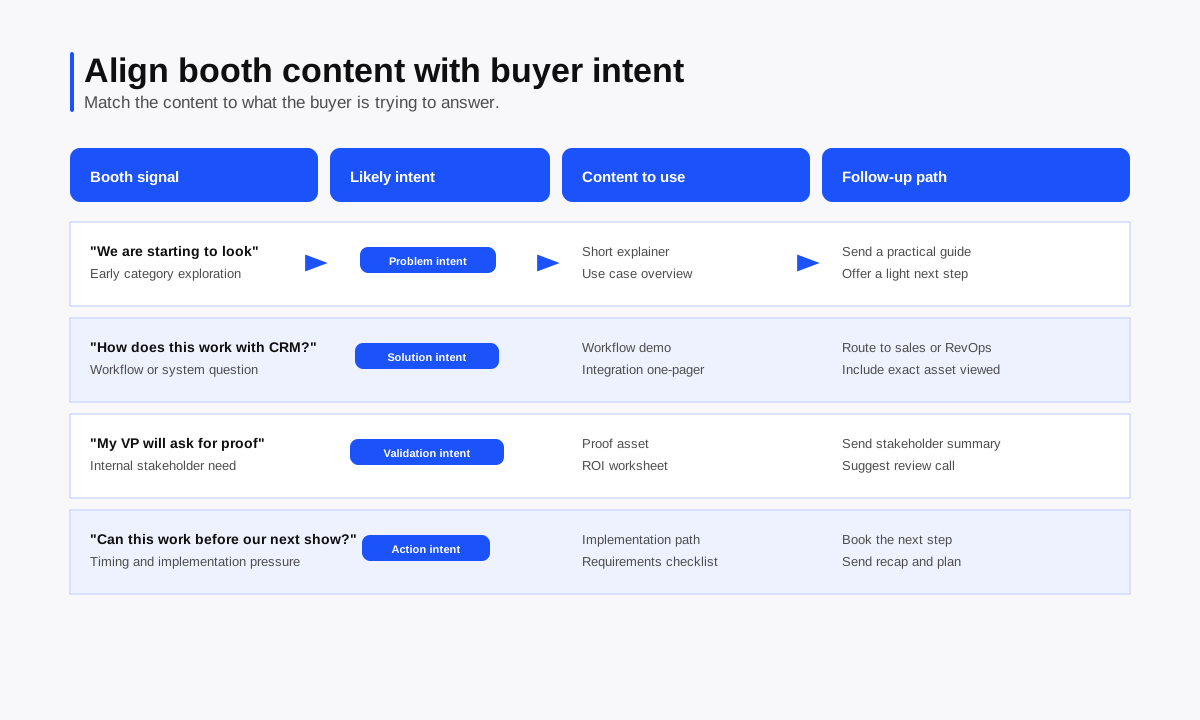
- Problem intent: the visitor wants to understand a challenge.
- Solution intent: the visitor wants to see possible ways to solve it.
- Validation intent: the visitor wants proof, requirements, or stakeholder support.
- Action intent: the visitor wants a meeting, proposal, implementation answer, or buying path.
This simple intent language keeps the booth team aligned without turning the conversation into a scoring exercise.
How to map booth content to buyer signals
Most booths carry too much content and too little decision logic. Build a small content map before the show so reps know what to use and when.
| Buyer signal | Likely intent | Useful booth content | Follow-up content |
| “We are just starting to look at this.” | Problem intent | Short explainer, use case overview, simple visual | Intro guide or problem checklist |
| “We use Salesforce and struggle with handoff.” | Solution intent | Workflow demo, integration one-pager | CRM handoff resource or integration detail |
| “My VP will ask for proof.” | Validation intent | Customer story, ROI worksheet, risk checklist | Stakeholder summary or proof asset |
| “Can this work before our next show?” | Action intent | Implementation path, technical requirements | Meeting recap and next-step plan |
| “Send me something on that exact issue.” | Specific interest | One matched asset | Personalized follow-up link |
momencio’s digital assets library page verifies that teams can store, present, and share event content assets such as brochures and videos. The planning work still sits with marketing and sales: decide which assets belong to which buyer signal.
How to avoid generic content dumping
Content dumping happens when a rep sends everything because they do not know what mattered. It creates three problems.
First, the buyer has to search for the relevant part. Second, sales loses the signal because every lead receives the same material. Third, marketing cannot tell which asset supported which conversation.
Use these rules on the floor:
- Show one asset at a time.
- Explain why it matches the visitor’s question.
- Capture which asset was shown or promised.
- Send the smallest useful follow-up package.
- Tie the next step to the buyer’s stated problem.
The point is not to hide content. The point is to make the content easier to use.
How to use content in the conversation
The best booth content supports the rep, rather than replacing the conversation. It gives the visitor something concrete to react to.
For early-stage visitors, use content to clarify the problem. A short checklist, diagram, or workflow snapshot can help them name what is happening in their process.
For active evaluators, use content to answer specific questions. A workflow demo, integration sheet, security overview, or comparison guide can keep the conversation grounded.
For stakeholders, use content to help them explain the issue internally. A summary, ROI worksheet, or recap asset can make the next internal conversation easier.
The rep should capture the content path in the lead record. “Viewed CRM handoff workflow, asked for Salesforce detail” gives sales far more to work with than “sent deck.”
How to use content after the conversation
Post-event content should continue the booth conversation. It should not restart with a generic thank-you and a product brochure.
Use the booth note to decide the follow-up:
| Booth note | Better follow-up |
| Asked about CRM sync | Send integration-specific content and suggest a RevOps conversation. |
| Worried about sales adoption | Send a staff workflow or enablement resource. |
| Needed proof for leadership | Send a concise proof asset or ROI worksheet. |
| Wanted implementation timing | Send next-step requirements and offer a planning call. |
LiveMicrosites™ fit naturally here. momencio’s LiveMicrosite page verifies lead-specific landing pages, dynamic content, unique links per lead, assets pulled from the library, editable content after sending, and live engagement tracking. That means the follow-up can carry the content tied to the booth conversation and can be adjusted as the conversation evolves.
How engagement after the event informs sales
Buyer intent does not stop when the attendee leaves the booth. Post-event engagement can show which topic still matters.
If a lead opens the follow-up, views the CRM integration asset, returns to the same resource, or clicks a call-to-action, sales has a better reason to reach out. If a lead never engages, the next touch should probably be lighter.
momencio’s IntelliStream page verifies a centralized stream of lead engagement across events, reps, forms, microsites, and more, including asset-level engagement. momencio’s article on how to track lead engagement after events also explains why trackable content gives teams better follow-up visibility than static attachments.
Use those signals carefully. An asset view is not a closed deal. It is a reason to make the next message more relevant.
Common booth content mistakes
Showing the deck too early
A deck shown before discovery usually forces the visitor into your order of ideas. Ask one or two questions first, then choose the content.
Sending the same follow-up to everyone
Same-message follow-up ignores the reason each person stopped. Segment by pain point, role, urgency, and content path.
Treating content as proof of interest
Picking up a brochure does not prove buying intent. Pair content activity with conversation context and next-step behavior.
Forgetting to capture the content path
If the rep does not record which asset mattered, sales loses a follow-up hook. Capture the asset discussed, the question it answered, and the promised next step.
momencio’s guide on how to follow up on sales leads using booth behavior signals supports this principle: follow-up improves when it reflects what the buyer actually did or asked about.
Where momencio fits naturally
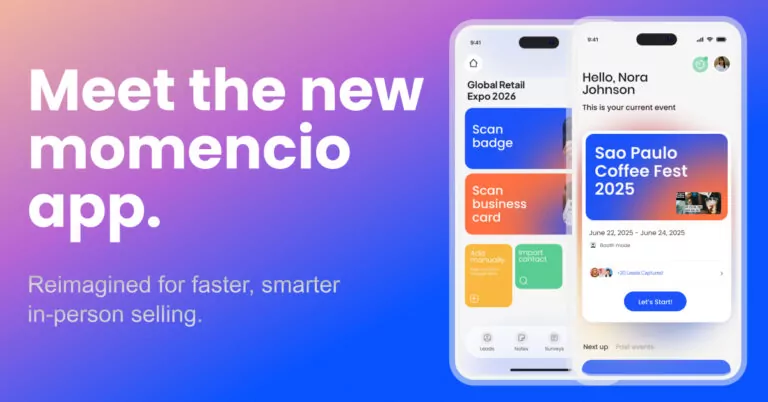
momencio fits content alignment when teams need to connect lead capture, booth context, content delivery, and post-event engagement. Official momencio pages verify the digital assets library, LiveMicrosites™, IntelliStream, email follow-up, smart notes, lead capture, CRM integrations, and event dashboards.
The workflow is practical. Capture the lead. Record the buyer’s intent and pain point. Share content matched to that signal. Track engagement after the event. Give sales a clearer next step based on both the booth conversation and the buyer’s later activity.
Frequently asked questions
What does buyer intent mean at a trade show booth?
Buyer intent means the visitor shows or states a reason to care, such as a problem, comparison, urgency, technical question, stakeholder need, or agreed next step.
How should booth teams choose which content to show?
Booth teams should ask a few context questions first, then choose content that matches the buyer’s pain point, role, buying stage, and next step.
What is content dumping?
Content dumping means sending too much generic material because the team did not capture what mattered. It makes follow-up less relevant and harder for the buyer to use.
How can post-event engagement show buyer intent?
Post-event engagement can show which assets a lead opens, views, returns to, or acts on. Those signals help sales choose a more relevant follow-up message.
Should every booth visitor receive the same follow-up content?
No. Follow-up content should reflect the visitor’s pain point, role, urgency, and content path. A broad overview may help an early researcher, while an evaluator may need integration or proof material.
If your team wants booth content to support real buying signals, momencio helps capture intent, send relevant content, and turn post-event engagement into a clearer path for sales follow-up.