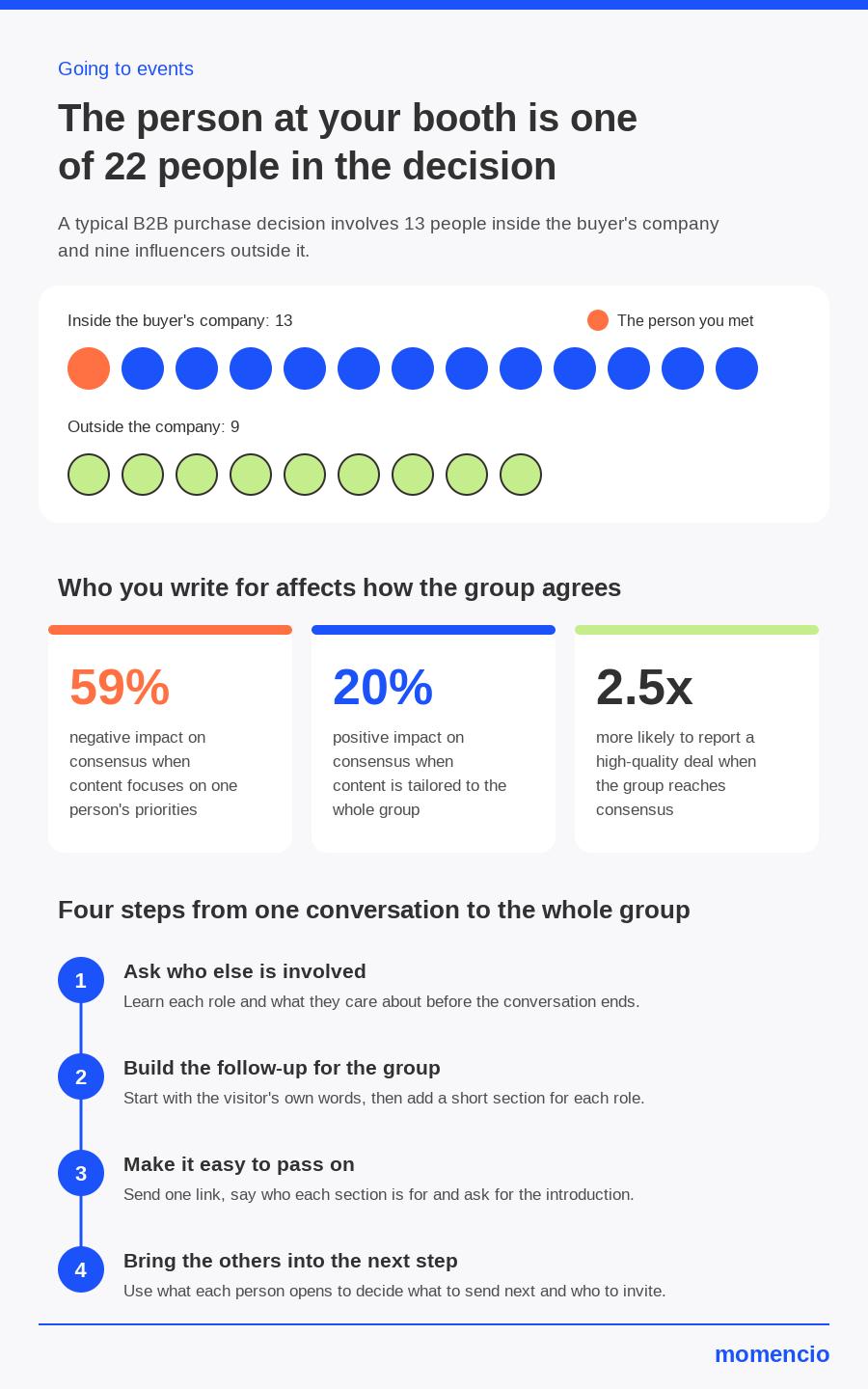
A B2B purchase is decided by a group of people, and the person you spoke with at your booth is one of them. The typical purchase decision now involves 13 people inside the buyer’s company and nine influencers outside it, and procurement is among the decision makers in 53% of buying cycles. Of those 22 people, the visitor is often the only one who heard your conversation.
Everything the rest of the group learns about you after the show passes through that person: a summary in a team meeting, a forwarded email, a link dropped into a chat. Your follow-up is the material they will work from, so it has to make sense to people you have yet to meet.
It also has to be built for the group. A survey of B2B buyers found that content focused on what matters to one individual can create conflict inside a buying group, with a 59% negative impact on the group’s consensus. Content tailored to the group as a whole improved consensus by 20%, and groups that reached consensus were 2.5 times more likely to report a high-quality deal.
This article covers how to turn one event conversation into a follow-up the whole group can use: what to ask before the conversation ends, how to build the follow-up for several readers, how to make it easy to pass on, and how to bring the others into the next step.
What a buying group is and why it changes your follow-up
A buying group is everyone who takes part in a purchase decision. Inside the buyer’s company, it usually includes the person with the problem, the manager who owns the budget, finance, IT or security, procurement and the people who would use what you sell every day. Outside the company, buyers also check their thinking with people whose judgment they trust, such as peers in their industry.
Each of these people arrives with a different question. Finance will want to know what it costs and when it pays back, IT will look at how it connects to their systems and how data is protected, procurement will ask for terms and paperwork, and the team who would use it will want to know how it changes their week.
The visitor can answer some of these questions on the spot, and the rest become their homework. This is where a strong conversation can stall: a convinced visitor tries to win over colleagues using only what you sent them.
Find out who else is involved before the conversation ends
The best moment to learn about the rest of the group is while the visitor is telling you what they need. A few plain questions are enough, and they fit into the part of the conversation where you are already asking about their situation. If your team follows a booth conversation framework, they belong in its discovery stage.
- Who else would need to be comfortable with this before you move ahead?
- Who usually looks at the cost on a decision like this?
- Would anyone in IT or security need to review it?
- How does your team normally make this kind of decision, and when?
- If I send you a summary, who would you share it with?
Note the answers while they are fresh: each role mentioned, a name if the visitor offered one, what that person is likely to care about and anything that could hold the decision up. A note as short as “finance signs off, IT will ask about data security, decision after the January budget review” is enough to plan the follow-up.
Take what the visitor is comfortable sharing. Some people will name their manager straight away, and others will only tell you which teams are involved. Either answer gives you enough to build the follow-up.
Build the follow-up for the group, starting with the visitor’s conversation
Open with what the visitor told you. Their problem, described in their own words, is what gets the follow-up read, and it is what they will repeat to colleagues. A follow-up that references the conversation earns that first read.
Next, write one short statement of the problem that everyone in the group can agree with, using the visitor’s words where you can. When every member reads the same description of what they are trying to solve, the group starts from common ground.
Then add a short section for each role the visitor mentioned, so they can point each colleague to the part written for them.
What each role usually needs from your follow-up
| Role | What they want to know | What to include |
| The person you met | That you understood their problem | A recap of the conversation and the next step you agreed |
| The budget owner | What changes for the team and the business | One customer result that matches their situation |
| Finance | What it costs and when it pays back | Pricing information or a simple way to estimate the return |
| IT and security | How it connects to their systems and how data is protected | Integration details and your security and privacy information |
| Procurement | Terms, contracts and vendor requirements | What your vendor setup needs and who to contact |
| The people who would use it | How it fits into their working day | A short video or walkthrough of everyday use |
Keep each section brief. Its job is to answer the first question that person will ask, so they can form a view without going back to the visitor.
Make it easy for the visitor to pass it on
Your follow-up travels as far as the visitor carries it, so make it easy to carry.
- Send one link that holds everything. A single page with the recap, the shared problem statement and each role’s section is simple to pass on, and everyone who opens it sees the same thing.
- Say who each section is for. A line such as “The security section is for whoever reviews new tools in your IT team” tells the visitor exactly where to send it.
- Ask for the introduction. When the visitor names a colleague, ask whether they would introduce you, or whether you may send that person their own copy.
- Keep the page current. When a colleague raises a new question, add the answer to the page, so everyone who opens it later sees the latest version.
Use what you see to bring the others into the next step
Once the follow-up starts moving inside the account, each sign of it tells you something about the decision.
- A colleague opening the page means the conversation has reached someone beyond the visitor.
- What each person opens shows what they care about. A finance contact who goes straight to pricing, or an IT contact who returns to the security section, is showing you the questions that will decide the deal.
- Repeat visits show where the group is still working something out, and they help you judge how long the lead is worth chasing.
- A colleague who received the page and has yet to open it may need a reason, such as a direct answer to the question their role usually asks.
Use these signs to decide what to send and who to invite. Thank the visitor when a colleague gets involved, offer to answer that colleague’s questions directly, and suggest a short call with the people who have looked. By the time the group meets, you know what each person read and what they are likely to ask.
Let what you see shape what you prepare, and keep every message about the reader’s own questions. Telling someone which pages they opened can feel intrusive, even when their interest is real.
How momencio shows you when the conversation spreads
momencio is an event lead capture and Field Revenue Intelligence platform that brings lead capture, sales enablement, personalized engagement and field intelligence together. Each step in this article has a place in it.
- Notes that keep the group in view. Reps can type or dictate notes in the momencio app during the conversation and add custom tags, so who else is involved and what each person cares about stay with the lead and sync to your CRM.
- One page built for the conversation. Each lead receives a LiveMicrosite, a personalized page with their name and the content that fits what they discussed. It opens with one click and no login, and you can add new content after sending it as the group’s questions come in.
- A share button that brings colleagues into view. When the visitor uses the share button on their LiveMicrosite, their colleague receives an email that names the rep who prepared the page, and momencio adds the colleague as a new contact. The share appears in the lead’s activity, and what the colleague views from then on is tracked under their own name.
- A live record of who is reading. Every view, click, download and revisit is logged in IntelliStream, so the rep can see which people in the account are engaging and with what.
For a sales leader, one booth conversation becomes a view of the account: who the visitor brought in, what each person has read and where the group still needs help. In your follow-up, ask the visitor to use the share button when they pass the page on, because that is what puts each colleague in that view.
Frequently asked questions
- What is a buying group in B2B sales?
- A buying group is everyone who takes part in a purchase decision. It usually includes the person who has the problem, the budget owner, finance, IT or security, procurement and the people who would use the product, along with people outside the company whose opinion the buyer trusts.
- How many people are in a typical B2B buying group?
- The typical B2B purchase decision now involves 13 people inside the buyer’s company and nine influencers outside it, and the number rises for more complex or strategic purchases.
- How do you find out who is in the buying group during a trade show conversation?
- Ask while the visitor is telling you what they need: who else would need to be comfortable with the decision, who looks at the cost, whether IT or security would review it, and how and when the team decides. Note each role and what that person cares about before the next visitor arrives.
- Should an event follow-up be personalized to the person you met?
- Yes. Start with the visitor’s own conversation, because that is what gets the follow-up read. Then add a shared statement of the problem and a short section for each role, because content built only around one person’s priorities can make it harder for the group to agree.
- How can you tell whether your follow-up reached other people in the account?
- Ask the visitor who they shared it with, and watch for new people from the same company opening it. With momencio, when the visitor shares their LiveMicrosite through its share button, the colleague is added as a new contact and the share appears in the lead’s activity.
- What should you do when a lead’s colleague engages with your follow-up?
- Thank the visitor for bringing them in, offer to answer the colleague’s questions directly and suggest a short call with the people who have looked. Let what they read shape what you prepare, and keep your messages about their questions.
See how momencio carries one conversation to the whole group
If your team is planning its next event, book a demo to see how notes, LiveMicrosites, the share button and IntelliStream work together. We recommend a demo because it is the quickest way to learn how to set momencio up so your team gets the most out of it from the first event.